Tsumiki
趣味で制作したアプリたちSide ProjectsSIDE PROJECTS趣味で制作したアプリたち
仕事とは別に、自分が本当に欲しくてつくった2つのiOSアプリ。ゼロから設計・デザイン・実装まで手がけました。カードをタップすると、それぞれの詳しい紹介が開きます。Two iOS apps I built on my own time, simply because I wanted them myself. I handled everything from concept and design to development. Tap a card to see the full story behind each one.

1日に5回、各2秒。撮りためた今日の断片が、夜にそっと1本の動画になる。文字のない、優しいモノクロの動画日記。Five moments a day, two seconds each. By nightfall, the day's fragments quietly become a single video. A gentle, wordless, monochrome video diary.

どのアプリでも、キーボードのマイクに話すだけ。AIがフィラーを消し、句読点を整えて、そのまま使える文章に。音声はぜんぶ端末の中で。In any app, just speak into the keyboard's mic. AI removes the filler words and tidies the punctuation, leaving text you can use as is. Your voice never leaves your device.
プレビューPREVIEWPreviewプレビュー
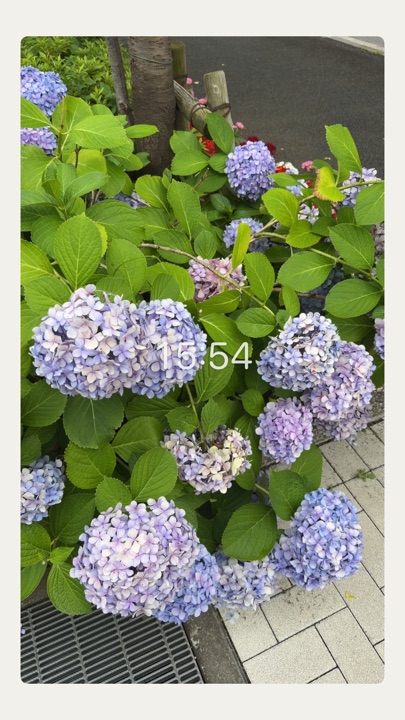
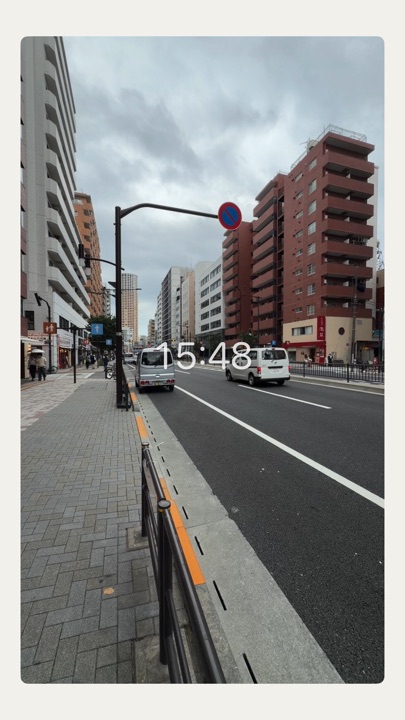
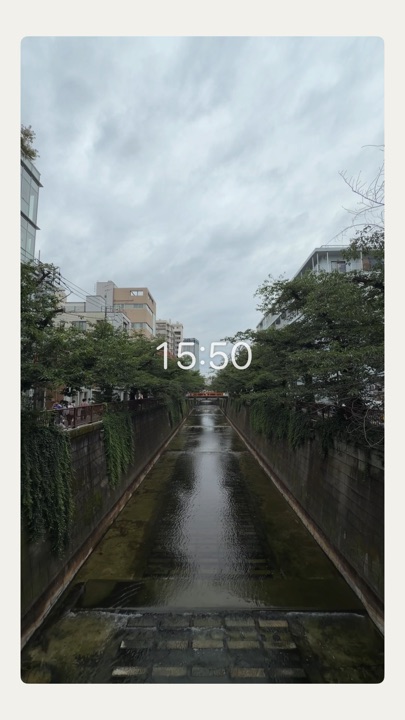
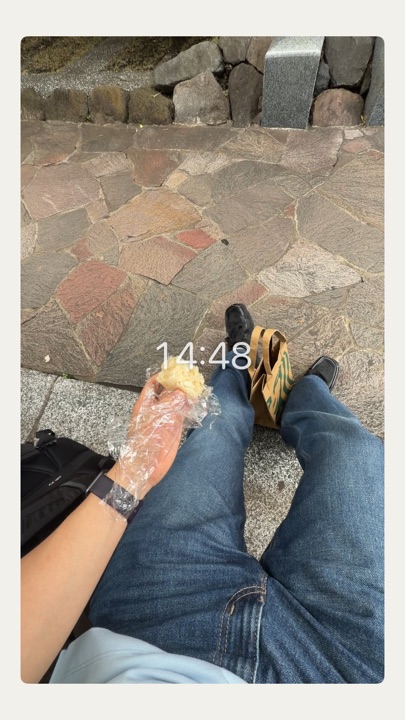
実際に「いつつ」で撮影・書き出しした動画の一場面です。映像は色そのまま、時刻だけが中央に静かに残ります。Stills from videos actually shot and exported with Itsutsu. The footage keeps its true colors; only the time remains, quietly, in the center.
紹介ABOUTAbout紹介
長く撮ると「ちゃんと撮ろう」になる。2秒なら、生活の一瞬をそっと拾うだけ。1本でも今日になり、5つで満ちる。ノルマではなく、今日を入れるための小さな器です。
夜、撮った分が時刻順に自動で1本(最大10秒)につながります。編集はいりません。できあがった“今日”は写真アプリに保存して、手元に残せます。Film for longer and you start trying to get the perfect shot. Two seconds lets you simply pick up a moment of everyday life. One clip already makes a day; five fill it. It isn't a quota — just a small vessel to hold today.
At night, your clips are automatically joined in order into one video (up to 10 seconds). No editing needed. Save the finished “today” to Photos and keep it with you.
つかいかたHOW IT WORKSHow It Worksつかいかた
- 01
撮るCapture
開くとすぐカメラ。丸をタップして、今を2秒だけ。Open the app and the camera is ready. Tap the circle and keep this moment — just two seconds of it.
- 02
つながるConnect
撮った分が、時間の順に自動で1本に。編集はいりません。Your clips are joined in order, automatically. No editing needed.
- 03
受け取るKeep
夜、今日を10秒で振り返る。写真アプリに保存して手元に。At night, look back on your day in ten seconds. Save it to Photos and keep it.
静けさの設計QUIET BY DESIGNQuiet by Design静けさの設計
あなただけのものJust for you
SNSも共有機能もありません。動画は端末の中だけ。誰にも見せなくていい。No social feed and no sharing features. Your videos stay on your device. You never have to show anyone.
文字のいらない操作No words needed
点とリングと余白で伝える。説明を読まなくても、触れば分かる。Dots, rings and empty space do the talking. There are no instructions to read — you'll understand the moment you touch it.
優しいモノクロGentle monochrome
はっきりした白黒ではなく、紙と墨のような温かい中立色。静かな世界観。Not stark black and white, but warm neutrals like paper and ink. A quiet world of its own.
記録は、本来の色でMemories in true color
UIはモノクロでも、残る動画はそのままの色。今日の記憶を均しません。The interface is monochrome, but your videos keep their real colors. Today's memories are never flattened.
情報INFORMATIONInformation情報
プレビューPREVIEWPreviewプレビュー
キーボードはモノクロのまま、使うアプリの中で活きます。開発コードの配色・レイアウトに合わせた再現イメージです(実機スクリーンショットは公開時に差し替え)。The keyboard stays monochrome and blends into whatever app you're using. These images recreate the app's actual colors and layout (they will be replaced with real screenshots at launch).
紹介ABOUTAbout紹介
どのアプリでも、キーボードのマイクをタップして話すだけ。AIが「えー」「あのー」を消し、句読点を整えて、そのまま使える文章をカーソルの位置に挿しこみます。
音声も、AIの整形も、ネットワークには一切出ません。機内モードでも動きます。アカウントも、月額も、いりません。あなたの声は、あなたのiPhoneから出ていかない。In any app, just tap the keyboard's mic and speak. AI removes the “ums” and “uhs,” fixes the punctuation, and inserts ready-to-use text right at your cursor.
Neither your voice nor the AI processing ever touches the network. It works even in Airplane Mode. No account, no subscription. Your voice never leaves your iPhone.
つかいかたHOW IT WORKSHow It Worksつかいかた
- 01
話すSpeak
マイクをタップして、いつもの調子で。言い直しても大丈夫。黙れば、自動で止まります。Tap the mic and talk the way you normally do. It's fine to rephrase. When you stop talking, it stops on its own.
- 02
整うTidy
「えー」「あのー」が消え、句読点が整う。「渋谷、いや新宿」は、ちゃんと「新宿」に。The “ums” and “uhs” disappear and the punctuation falls into place. “Shibuya — no, Shinjuku” becomes simply “Shinjuku.”
- 03
挿しこまれるInsert
元のアプリに戻ると、きれいな文章がカーソルの位置に。トン、という小さな手応えつき。Switch back to your app and clean text is waiting at the cursor, with a small, satisfying tap.
静けさの設計QUIET BY DESIGNQuiet by Design静けさの設計
完全オンデバイスFully on-device
文字起こしも整形も、端末の中のAIだけで。オフラインでも動きます。Transcription and cleanup both run on the AI inside your device. It works offline, too.
話し言葉のままYour own way of speaking
言い回しは変えません。消すのはフィラーだけ。「なんですけど」はそのまま残る。Your phrasing stays as it is. Only the filler words go; the casual turns of phrase you actually use remain.
育てる辞書A dictionary that grows
人名や専門用語を、あなたの表記で。登録するほど、あなたの文章になっていく。Names and technical terms, written your way. The more you add, the more the text reads like you.
優しいモノクロGentle monochrome
紙と墨のキーボード。真ん中にマイクがひとつ。それだけ。A keyboard of paper and ink. A single mic in the middle. That's all.
情報INFORMATIONInformation情報
つみきアプリたちTsumiki AppsTSUMIKI APPSつみきアプリたち
現場の“ちょっと困った”に合わせてつくった、つみきのアプリ。カードをタップすると、それぞれの詳しい紹介ページが開きます。Apps built around the small, everyday snags people run into at work. Tap a card to open its full product page.
 香盤メーカーKouban Maker
出られない日から「今できる場面」を出すEnter who can't make it, and see which scenes you can rehearse
香盤メーカーKouban Maker
出られない日から「今できる場面」を出すEnter who can't make it, and see which scenes you can rehearse
 まぜいろMazeiro
カラー剤の配合を、比率からグラムにTurns hair color ratios into grams
まぜいろMazeiro
カラー剤の配合を、比率からグラムにTurns hair color ratios into grams
 クレカ明細Card Statements
立て替えとクレカ支出を、切り分けて管理Keeps shared costs and card spending apart
クレカ明細Card Statements
立て替えとクレカ支出を、切り分けて管理Keeps shared costs and card spending apart
勤怠管理セットFOR TEAMSAttendance Set勤怠管理セット
労働者と管理者、対で使う2つ。現場で打刻し、会社側はそのまま集計。データはクラウドで共有されます。One for workers, one for managers — two apps designed to work as a pair. Staff clock in on site, and the office gets the totals without re-entering anything. Data is shared through the cloud.
「こういうの、うちにも欲しい」と思ったら。あなたの“ちょっと困った”に合わせて、専用のアプリをお作りします。初回のご相談は無料です。If you find yourself thinking, “We could use something like this,” I'll build an app tailored to your own everyday snags. Your first consultation is free.
無料で相談する→Get a free consultation→
出られない日と、その日の出入り(◯時入り/◯時出し)を入れておくと、その時間にできる場面だけを香盤表からすっと抜き出す道具。「あと1人そろえばできる場面」まで出るので、交渉の当たりどころも分かります。限られた稽古時間を、段取りで悩まずに使い切るためのアプリです。Enter the days people can't attend, along with any late arrivals or early departures, and it pulls out only the scenes you can rehearse in that time from your scene breakdown. It even shows scenes that are just one person short, so you know exactly whose schedule is worth asking about. An app for making the most of limited rehearsal time, without the scheduling headaches.
制作の背景BACKGROUNDBackground制作の背景
もともと、稽古の現場では「今日は誰が来られないか」が分かるたびに、香盤表とにらめっこして『じゃあ今日はどの場面をやろう』と組み直していました。この照合が毎回じわじわ時間を食い、稽古の頭出しでもたついてしまう。
その“段取りのストレス”をなくすために、香盤メーカーは生まれました。欠席者を選ぶだけで「今日できる場面」が出るなら、迷っていた時間はまるごと稽古に回せる——そう考えて形にした一本です。
そのあと実際の稽古場でお使いいただくうちに、分かったことがありました。休みは終日だけではない——「◯時入り」「◯時出し」がある。そして稽古時間を前半・後半で区切ると、できる場面が変わる。いまの香盤メーカーは、その現場の声をそのまま入れた2代目です。出られない日の表(てっぱり表)をアプリの中に持ち、時間帯ごとに判定し、稽古全体の進み具合まで見えるようにしました。In rehearsal rooms, every time it became clear who couldn't come that day, the team would pore over the scene breakdown and rebuild the plan: “So which scenes can we do today?” That cross-checking quietly ate up time again and again, and rehearsals were slow to get started.
Kouban Maker was created to take that scheduling stress away. If simply selecting the absent cast members showed which scenes were possible, all the time spent deliberating could go straight back into rehearsal — that was the idea behind it.
Once it was in use in an actual rehearsal room, a few things became clear. Absences aren't always for the whole day — people arrive late or leave early. And dividing rehearsal time into first and second halves changes which scenes are possible. Today's Kouban Maker is the second version, built directly on that feedback from the rehearsal room. It keeps the conflict chart (who can't attend when) inside the app, checks each time slot, and even shows how far the whole rehearsal process has progressed.
プレビューPREVIEWPreviewプレビュー
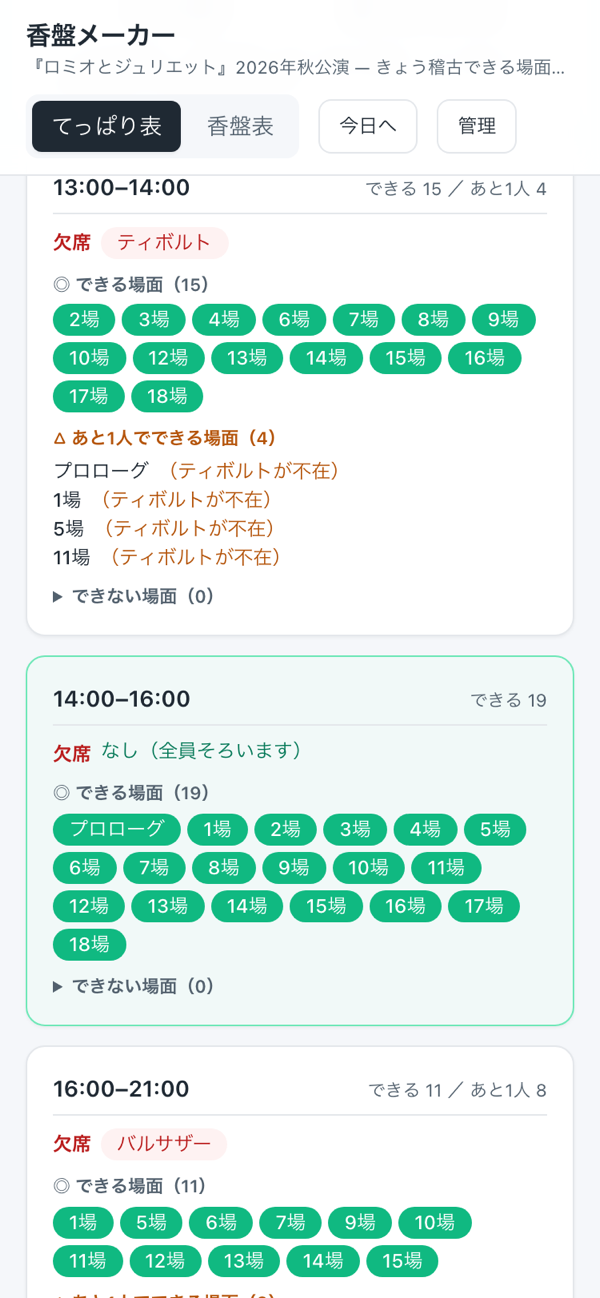
スマホ版iPhoneMobileスマホ版
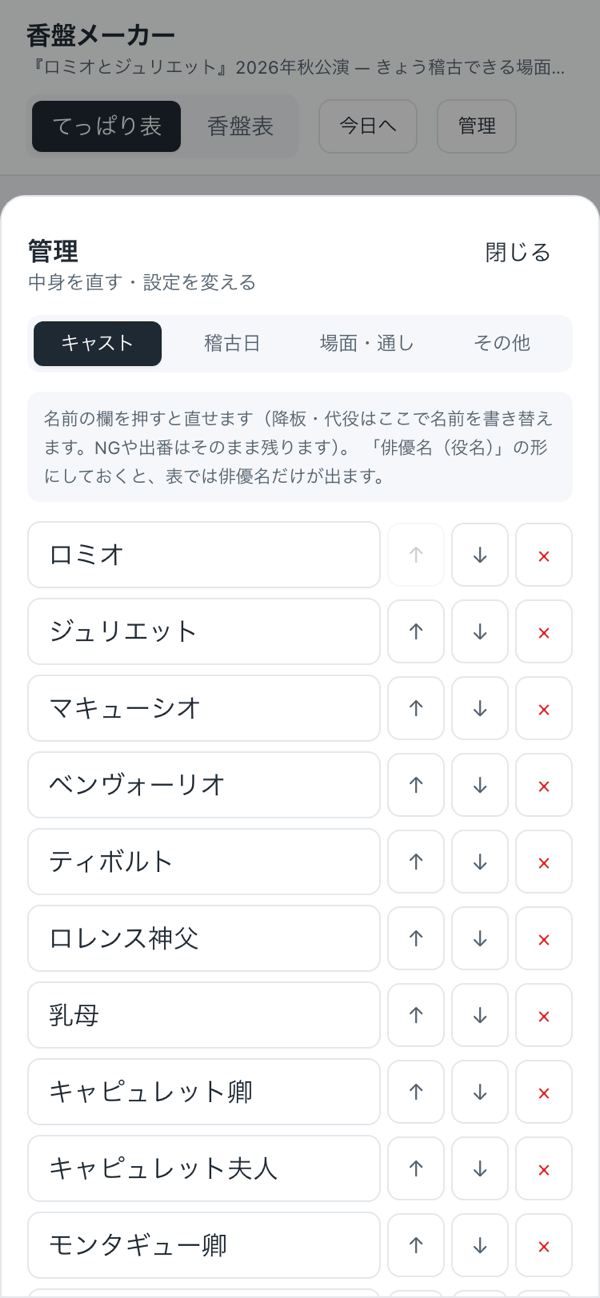
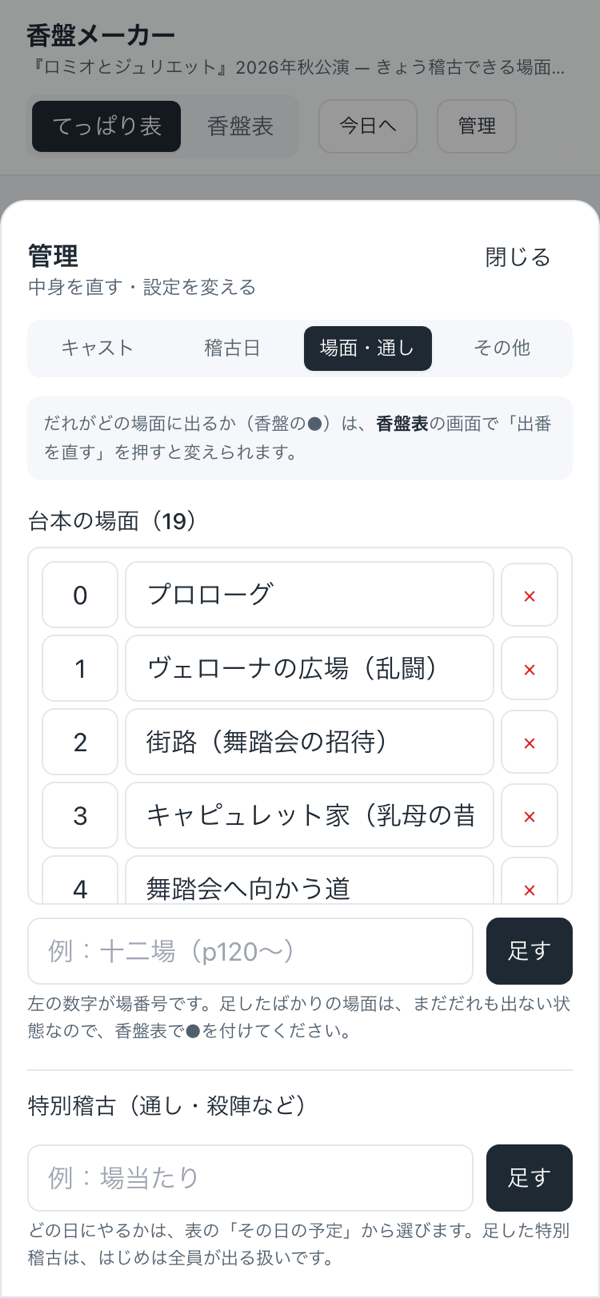
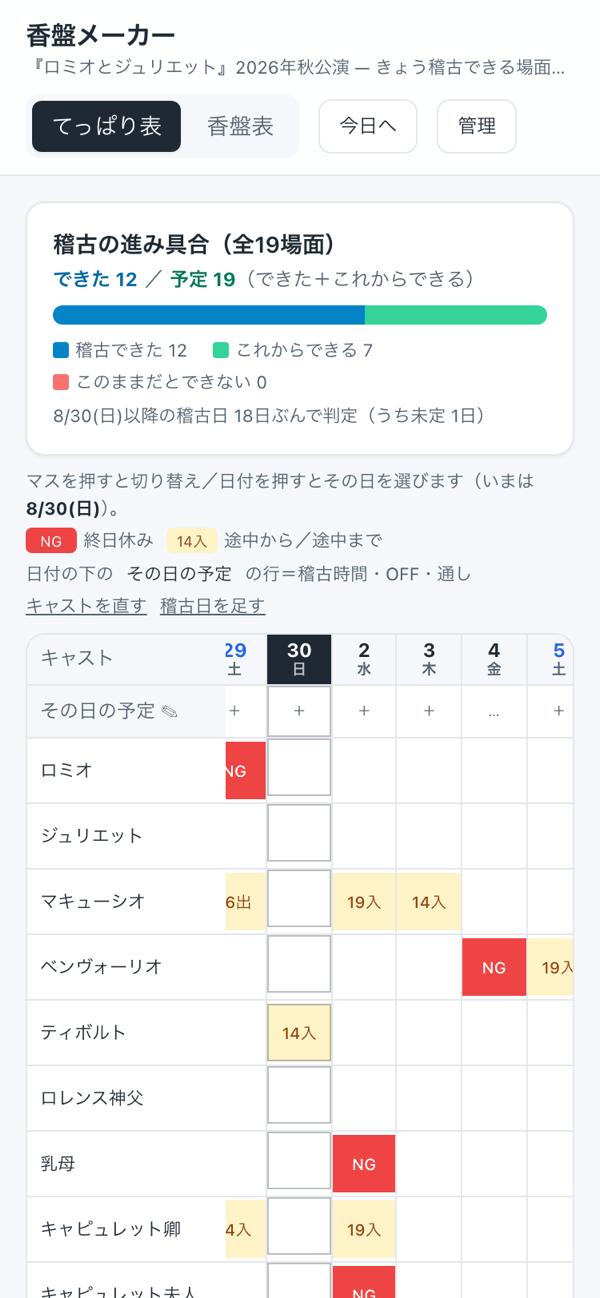
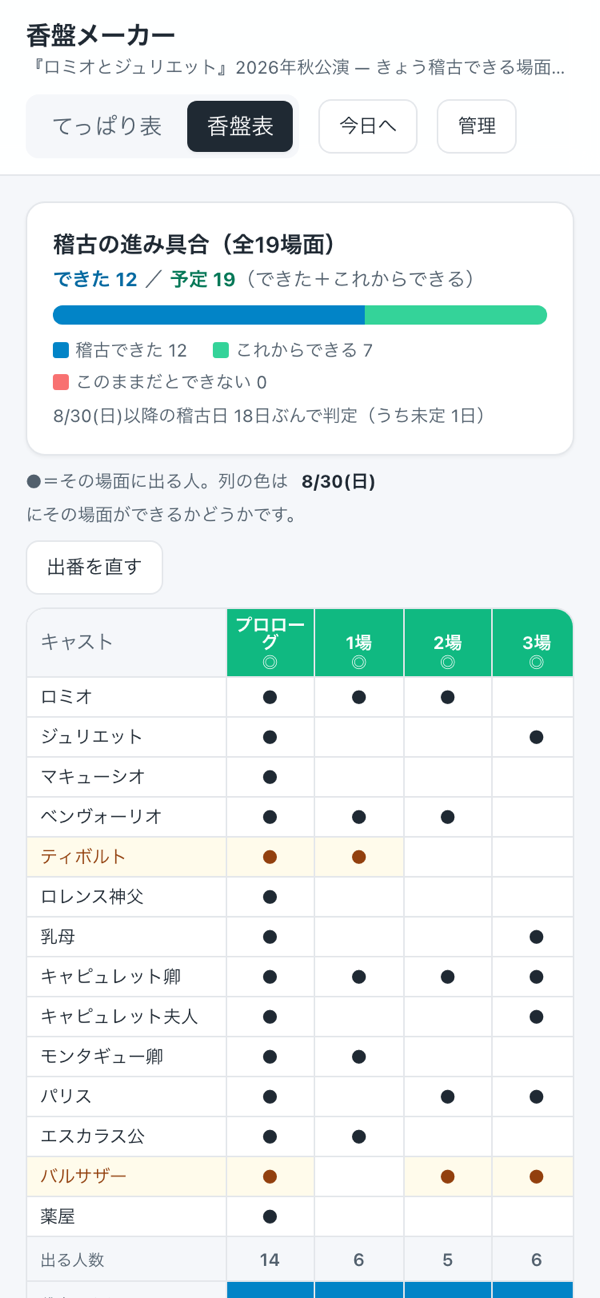
PC版DesktopDesktopPC版
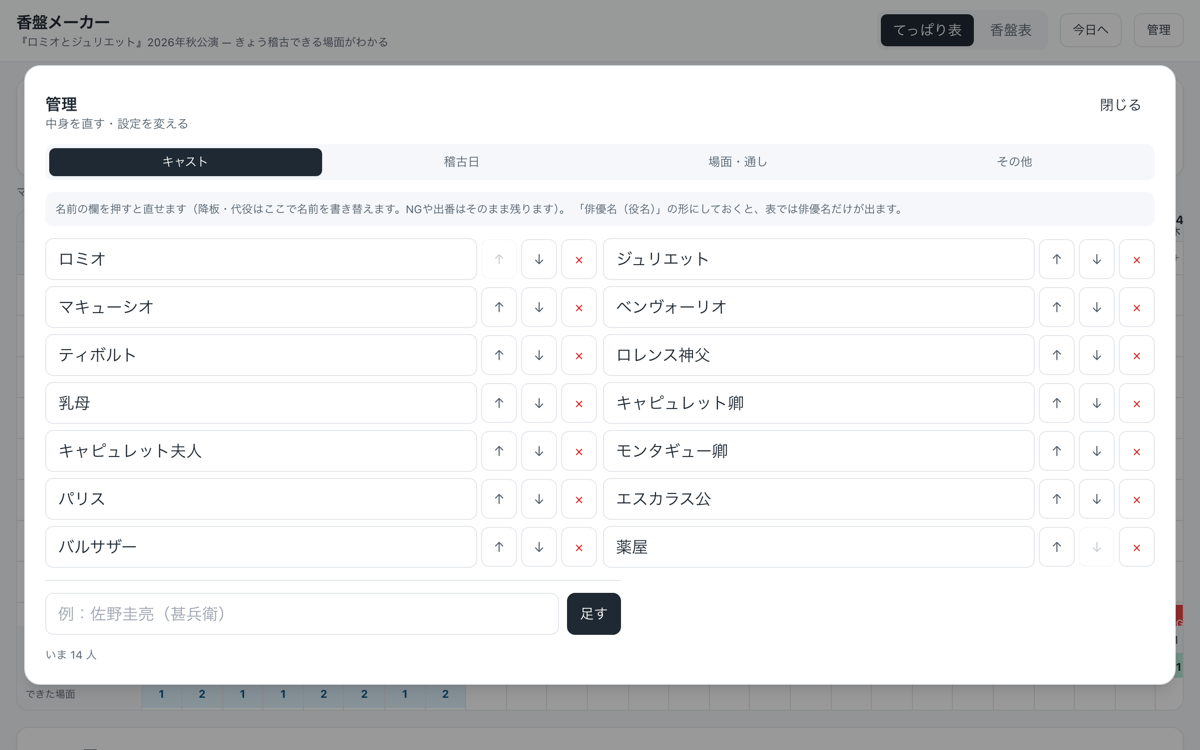
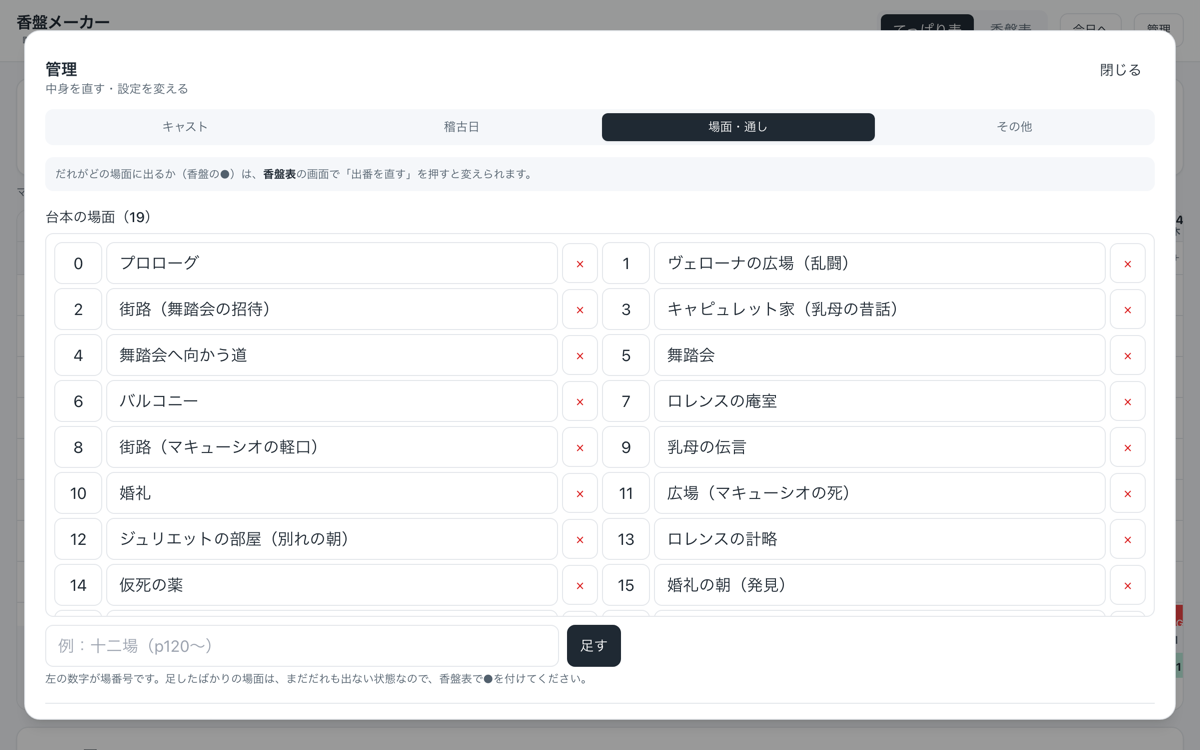
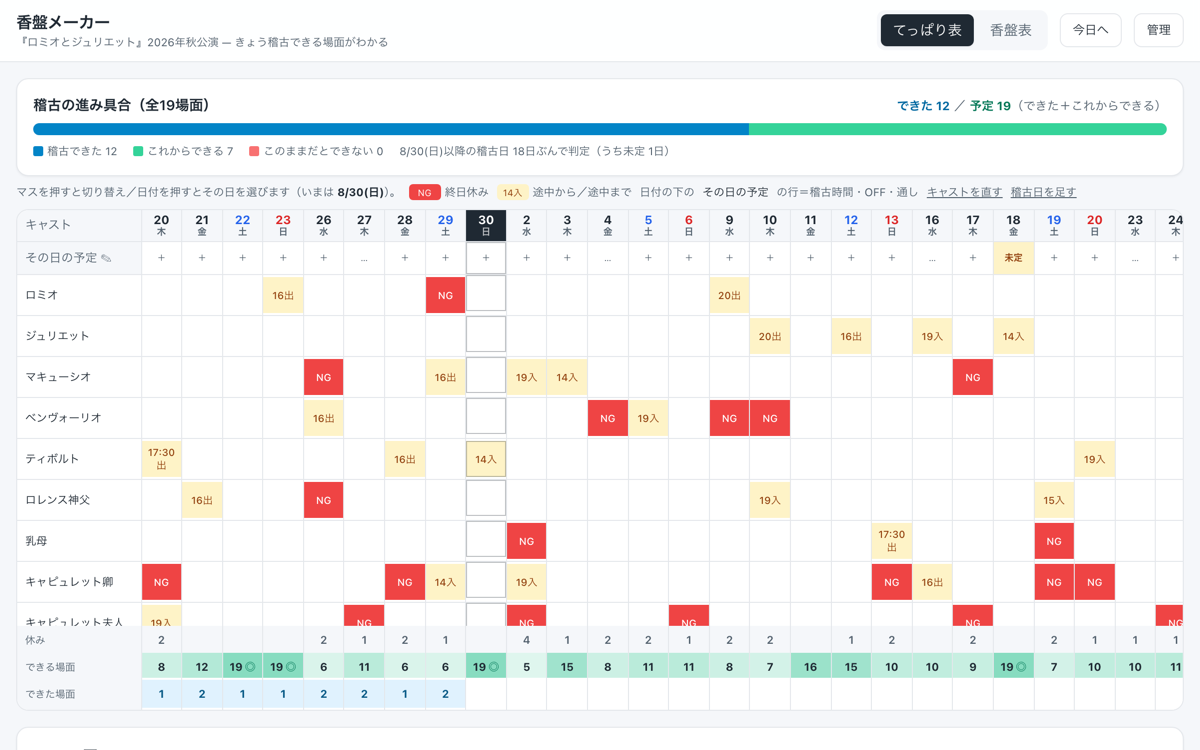
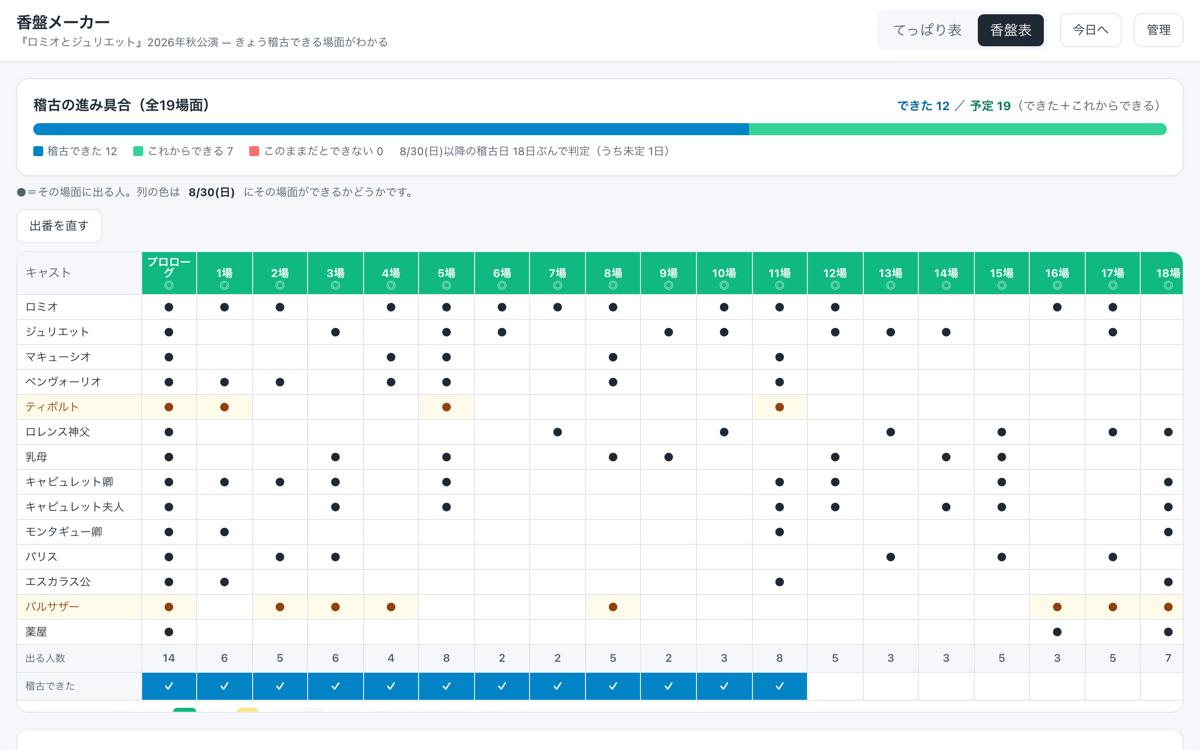
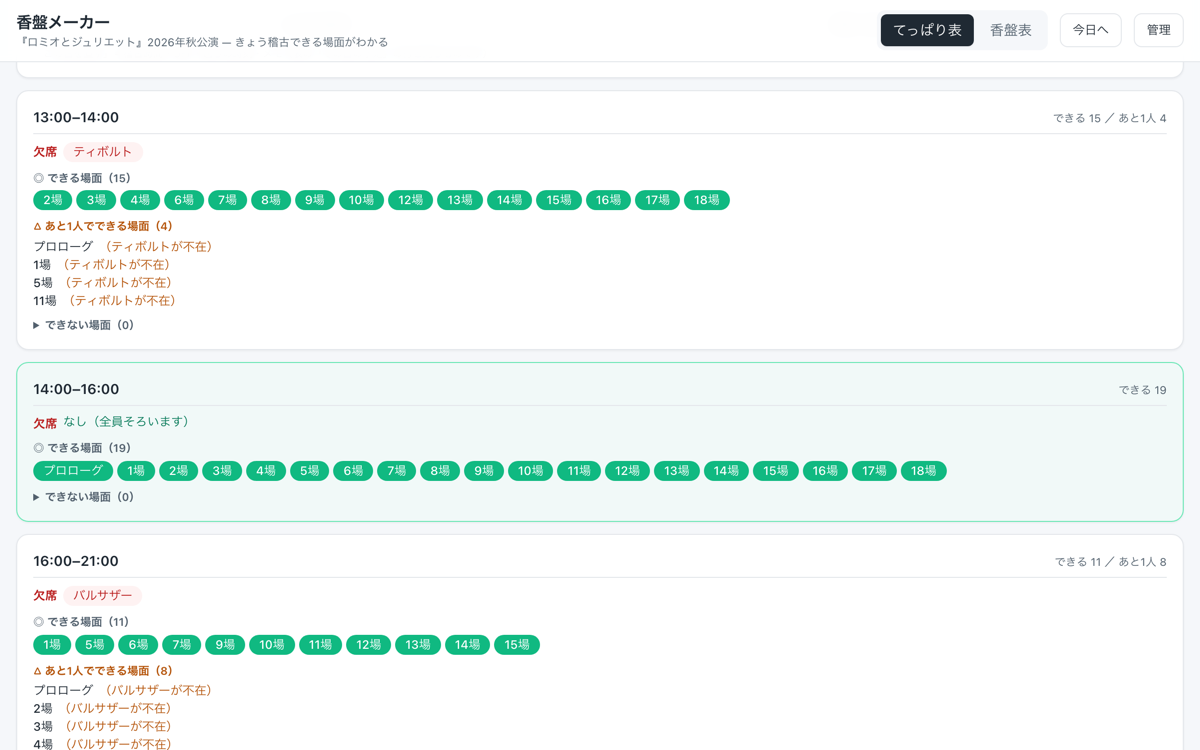
実際の「香盤メーカー」の画面です(サンプルは『ロミオとジュリエット』)。Actual screens from Kouban Maker (the sample is Romeo and Juliet).
書き出したPDFOUTPUTExported PDF書き出したPDF
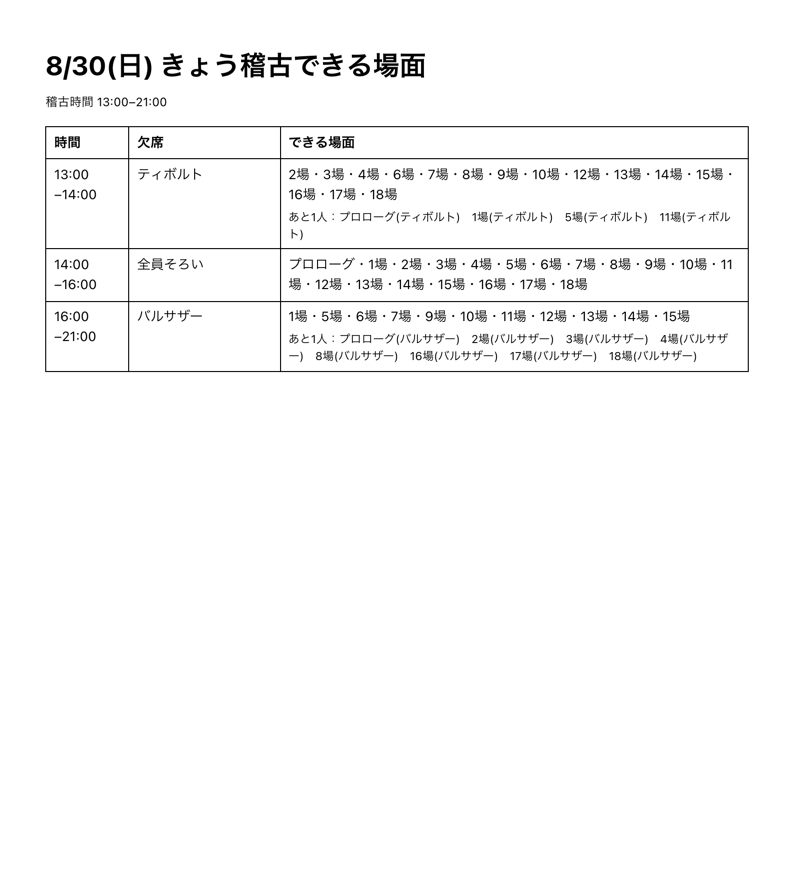
「印刷(貼り出し用)」を押すと、その日のぶんがそのまま1枚に。時間帯ごとに、欠席者・できる場面・あと1人でできる場面まで並びます。稽古場に貼っておけば、全員が同じものを見られます。掲載はサンプル『ロミオとジュリエット』です。Press “Print (for posting)” and the day's plan fits on a single sheet. For each time slot, it lists who's absent, which scenes are possible, and which are just one person short. Post it in the rehearsal room and everyone sees the same plan. The example uses the sample production, Romeo and Juliet.
くわしくSTORYThe Storyくわしく
こんな場面でSITUATIONSituationこんな場面で
演劇やダンスの稽古前。出演者それぞれの予定がバラバラで、その日に全員はそろわない。Before rehearsals for a play or dance production. Everyone's schedules are different, so the full cast is rarely there on the same day.
困っていたことTASKChallenge困っていたこと
「誰が休みか」と「その場面に誰が要るか」を毎回つき合わせて、今日どこを稽古できるかを探すのに時間がかかる。稽古場に着いてから慌てて組み直すことも。Every time, someone had to match “who's absent” against “who's needed in each scene” to figure out what could be rehearsed that day, and it took a long time. Sometimes the plan had to be rebuilt in a rush after arriving at the rehearsal room.
アプリがすることACTIONSolutionアプリがすること
台本の場面と、そこに出る役(香盤)を一度だけ登録。あとは出られない日と「◯時入り/◯時出し」を入れるだけ。稽古時間を時間帯で区切って、その時間に全員そろう=できる場面を自動で並べます。「あと1人そろえばできる場面」も、誰が足りないかと一緒に出ます。Register the scenes in the script and the roles that appear in each (the scene breakdown) just once. After that, simply enter unavailable days and any late arrivals or early departures. It divides rehearsal time into slots and automatically lists the scenes where everyone needed is present. Scenes that are one person short are shown too, along with who is missing.
こう変わるRESULTResultこう変わる
稽古の段取りが数秒で決まり、限られた時間を「今日できること」に集中できる。先の稽古日まで並ぶので、その日になってから組み直すのではなく、先に最後まで組んでおける。全何場面のうち、できた/これからできる/このままだとできない、も一目で分かります。2026年夏の本多劇場公演で、実際にお使いいただきました。The rehearsal plan comes together in seconds, so limited time goes into what can actually be done today. Because future rehearsal days are laid out as well, you can plan all the way to the end in advance instead of reshuffling on the day. You can also see at a glance which scenes are done, which can still be rehearsed, and which won't be possible as things stand. It was used in a real production at the Honda Theater in summer 2026.
情報INFORMATIONInformation情報
この香盤メーカーは、2026年夏の本多劇場公演で実際にお使いいただきました。演出助手の方から伺ったお話を、そのまま載せています。Kouban Maker was used in a real production at the Honda Theater (Shimokitazawa, Tokyo) in summer 2026. Here is what the assistant director told me, in their own words.
お客様の声はこちら→Read the client story→「こういうの、うちにも欲しい」と思ったら。あなたの“ちょっと困った”に合わせて、専用のアプリをお作りします。→ 無料で相談するIf you find yourself thinking, “We could use something like this,” I'll build an app tailored to your own everyday snags. → Get a free consultation
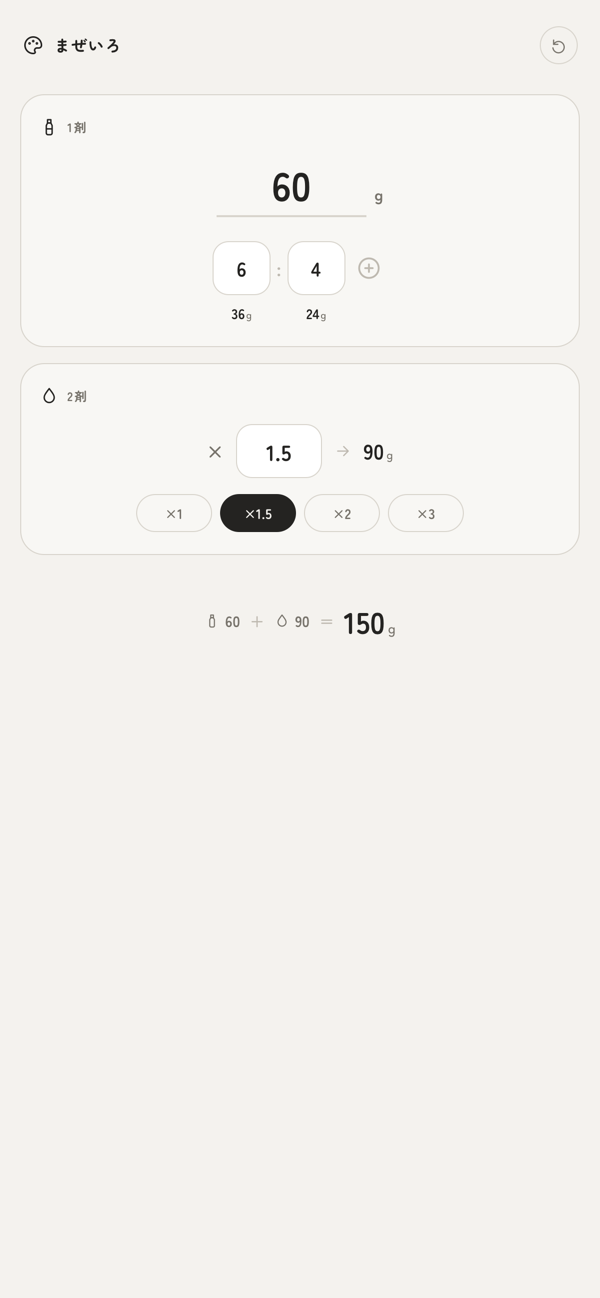
レシピの比率と作りたい量を入れるだけで、各カラー剤が何グラム必要かを即計算。2剤(オキシ)の倍率にも対応します。混ぜる前の“あの計算”をなくすアプリです。Just enter the recipe's ratio and the amount you need, and it instantly calculates how many grams of each color product to use. It handles developer (oxidant) ratios, too. An app that does away with that familiar math before mixing.
制作の背景BACKGROUNDBackground制作の背景
美容室の現場では、カラー剤のレシピが「1:1」「1:1.5」のような比率でしか残っていないことが多く、そのたびに『じゃあ何グラムと何グラム』と暗算・計算し直していました。作る量を変えればまた計算、混ぜ間違えれば材料もやり直し。
その“毎回の換算ストレス”を消すために、まぜいろをつくりました。比率と総量さえ入れれば必要なグラムが出るなら、計算に取られていた集中を、施術そのものに戻せる——そう考えて形にしました。In salons, hair color recipes are often recorded only as ratios, such as 1:1 or 1:1.5, so every time, stylists had to work out “how many grams of this and how many of that” in their heads or on a calculator. Change the amount and it's back to the math; mix it wrong and the product is wasted.
I built Mazeiro to take away the stress of converting every single time. If entering the ratio and the total amount gave you the grams you need, the focus spent on calculating could go back to the client — that was the idea behind it.
プレビューPREVIEWPreviewプレビュー
スマホ版iPhoneMobileスマホ版
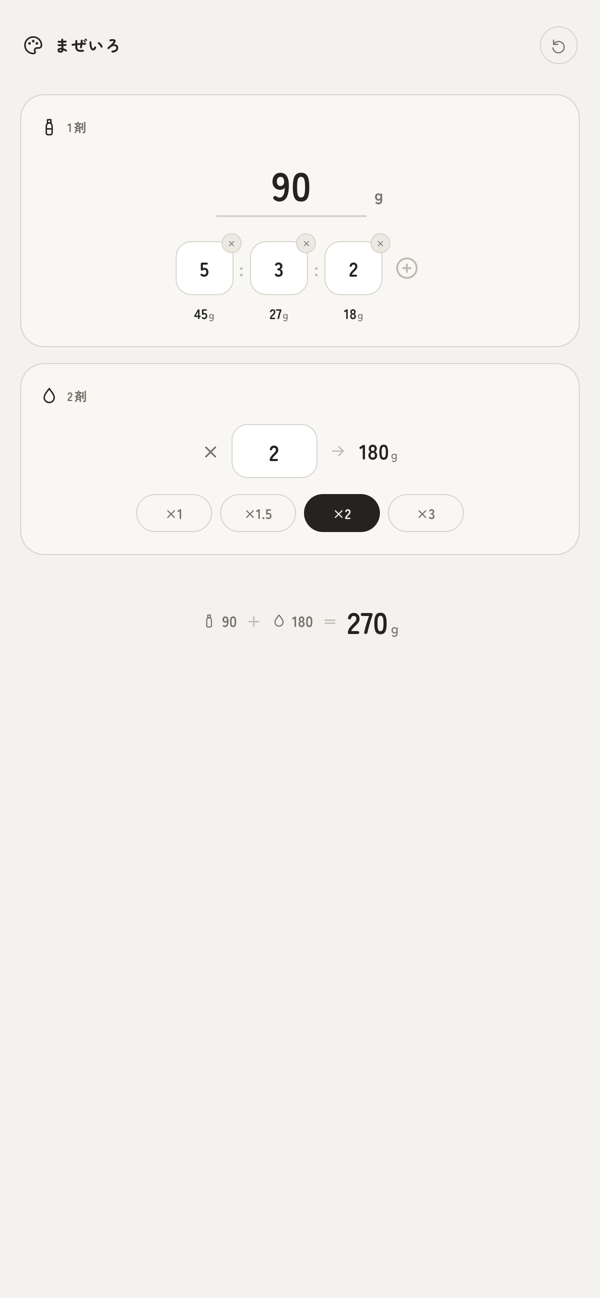
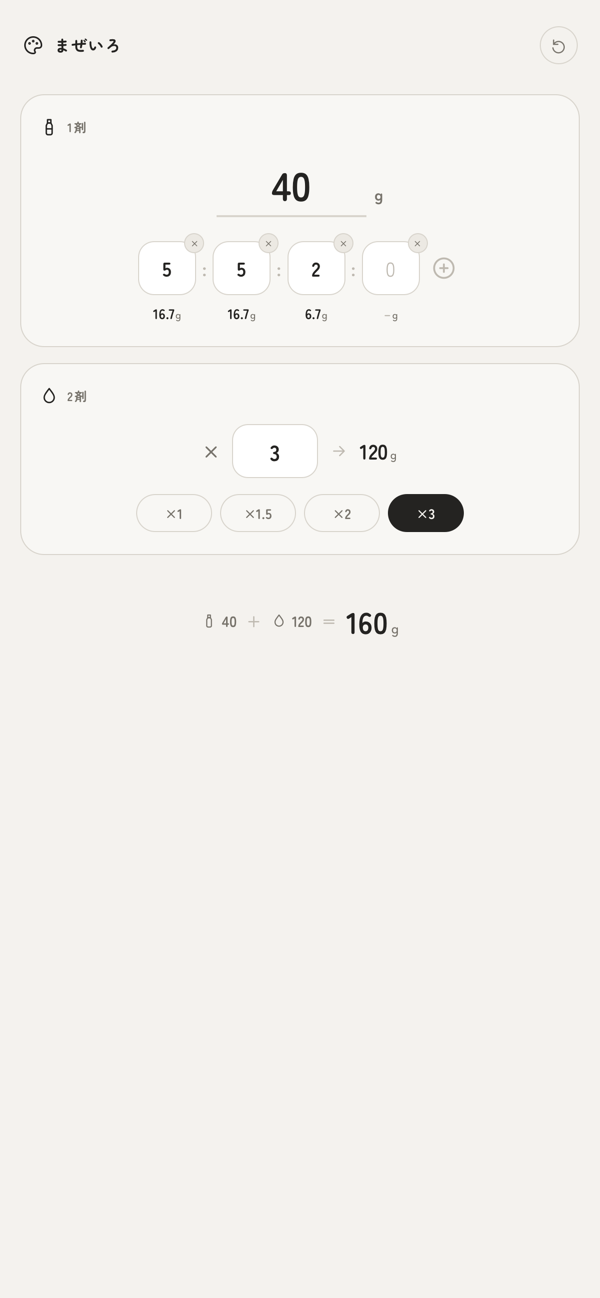
PC版DesktopDesktopPC版
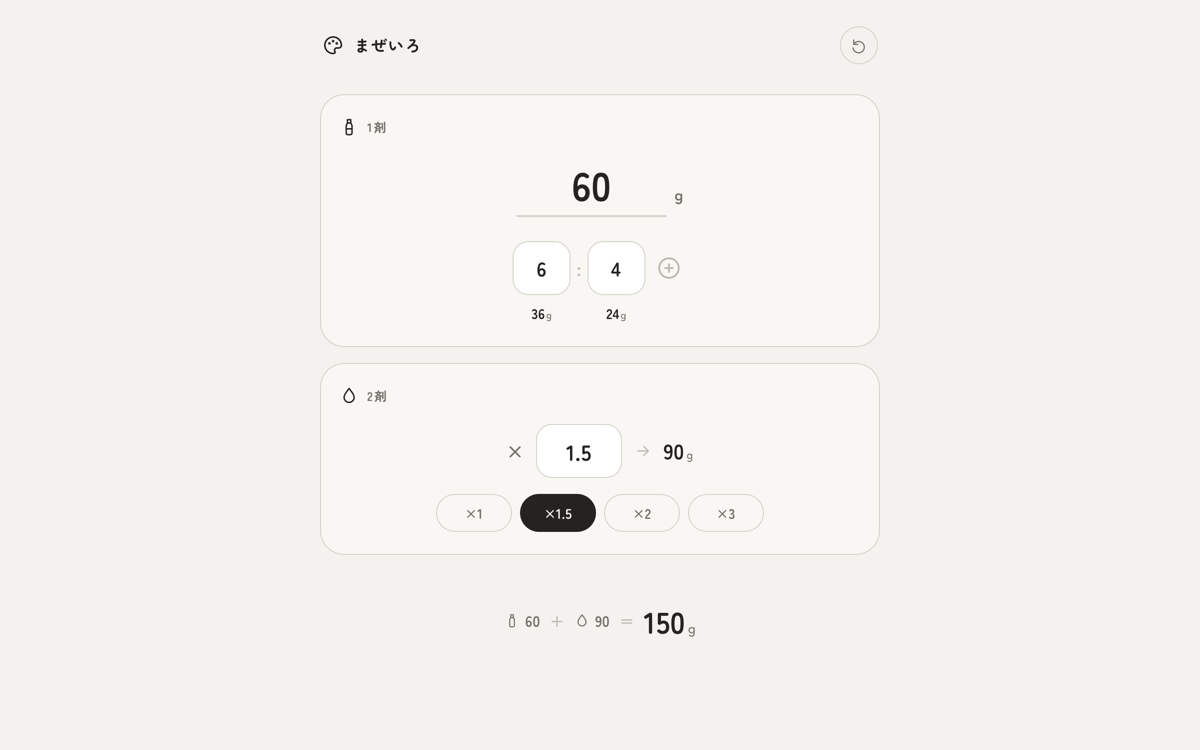
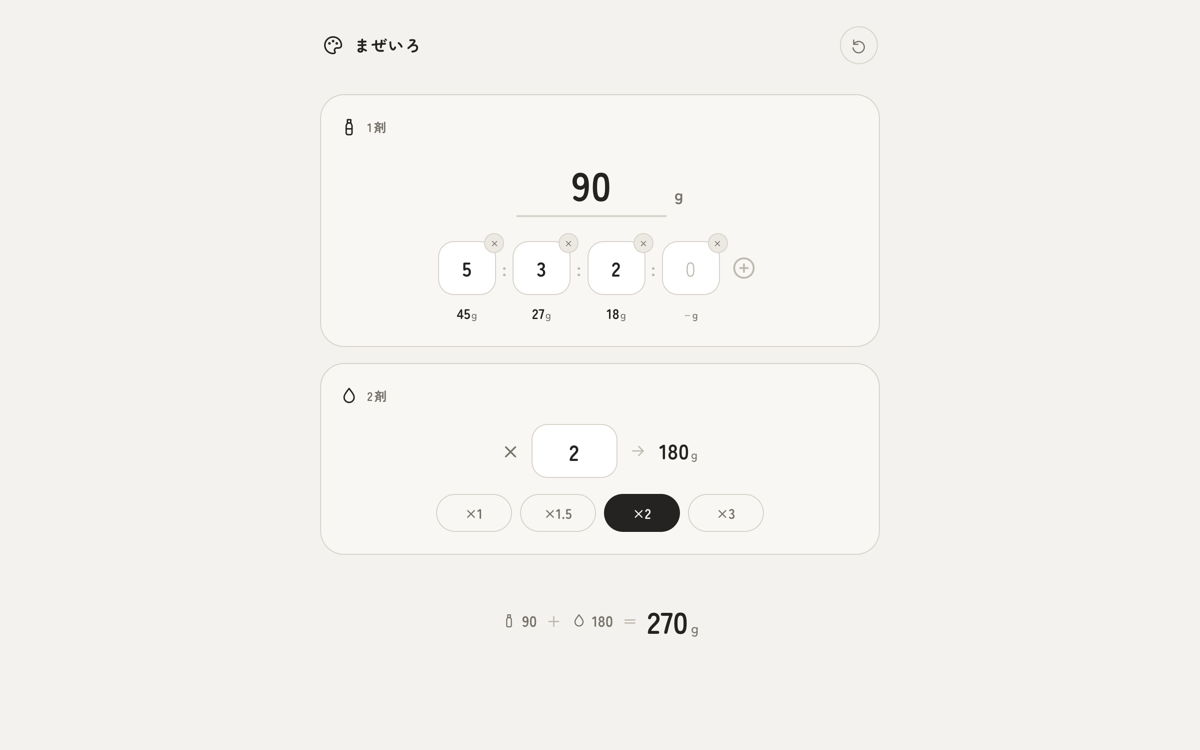
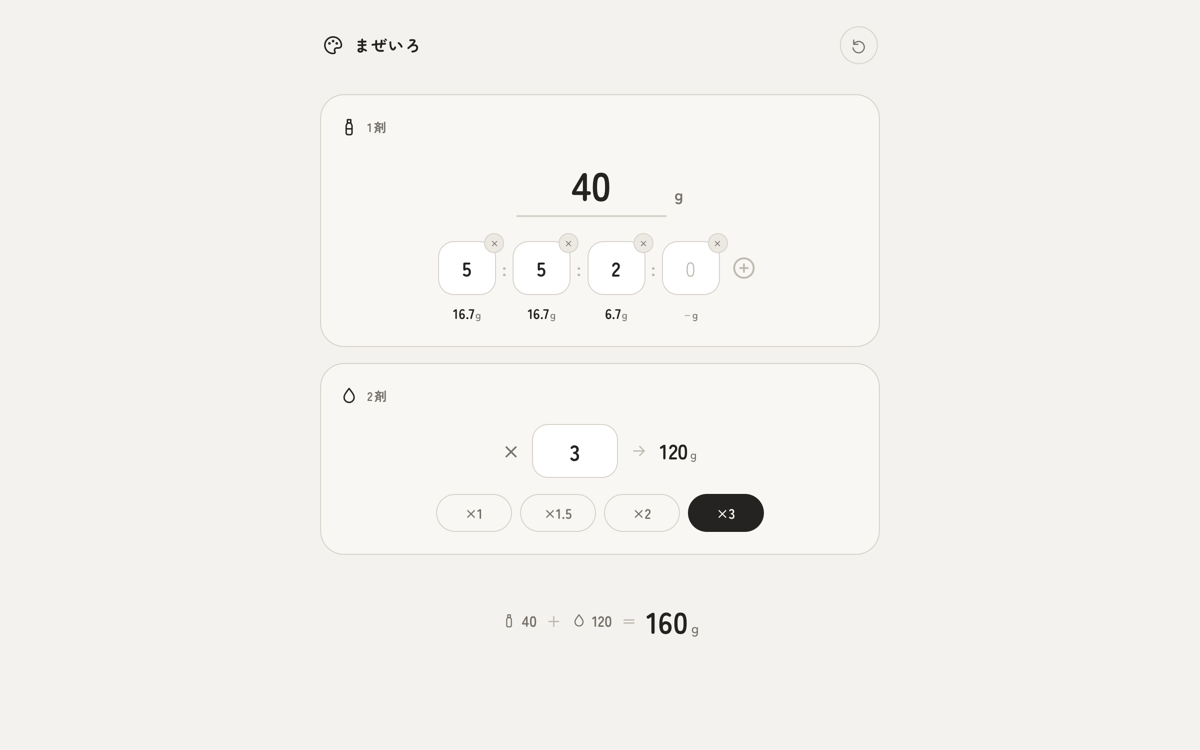
実際の「まぜいろ」の画面です(数値はサンプルの配合例)。Actual screens from Mazeiro (the numbers are a sample recipe).
くわしくSTORYThe Storyくわしく
こんな場面でSITUATIONSituationこんな場面で
美容室でヘアカラーを調合するとき。レシピは比率でしか残っておらず、作る量はお客様ごとに変わる。Mixing hair color at a salon. Recipes exist only as ratios, and the amount needed changes with every client.
困っていたことTASKChallenge困っていたこと
比率からグラムへの換算を毎回手計算。総量を変えるとやり直しになり、混ぜ間違いは材料のロスに直結する。Converting ratios to grams by hand, every time. Changing the total means starting over, and a mixing mistake means wasted product.
アプリがすることACTIONSolutionアプリがすること
比率と作りたい総量を入れるだけで、各剤の必要グラムを自動計算。2剤の倍率にも対応し、総量からの逆算もできる。Just enter the ratio and the total amount you want, and it calculates the grams of each product automatically. It supports developer ratios and can also work backward from the total.
こう変わるRESULTResultこう変わる
調合前の計算がゼロに。ミスと材料のロスが減り、手を止めずに施術へ集中できる。No more math before mixing. Fewer mistakes, less waste, and full attention on the client without stopping.
情報INFORMATIONInformation情報
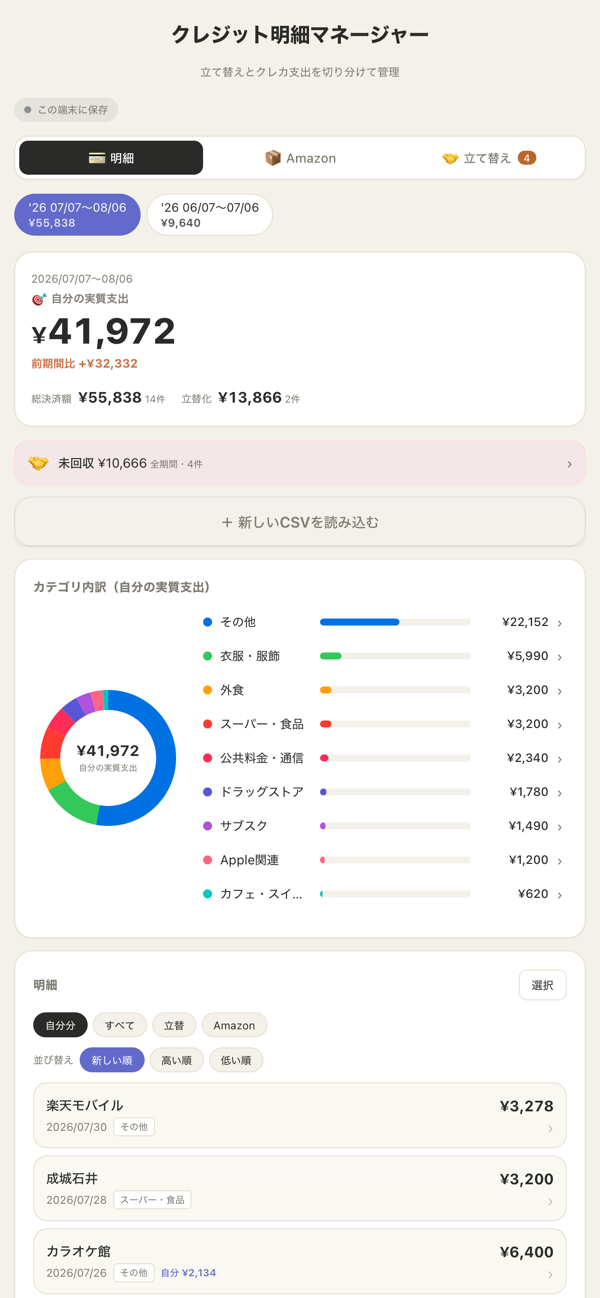
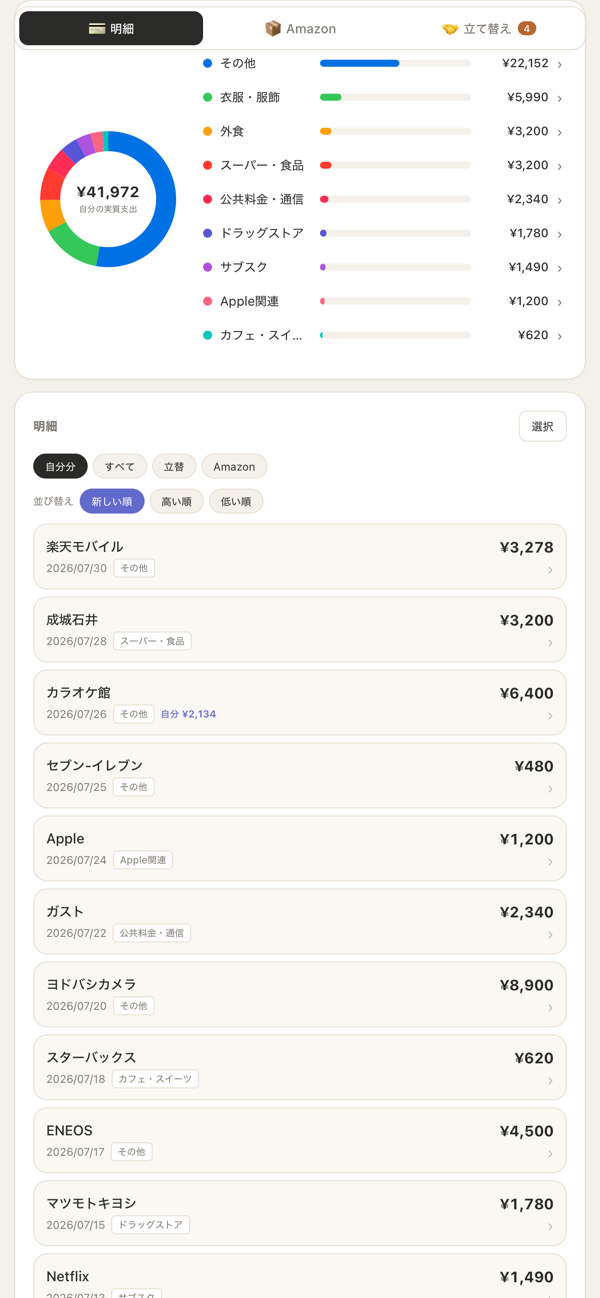
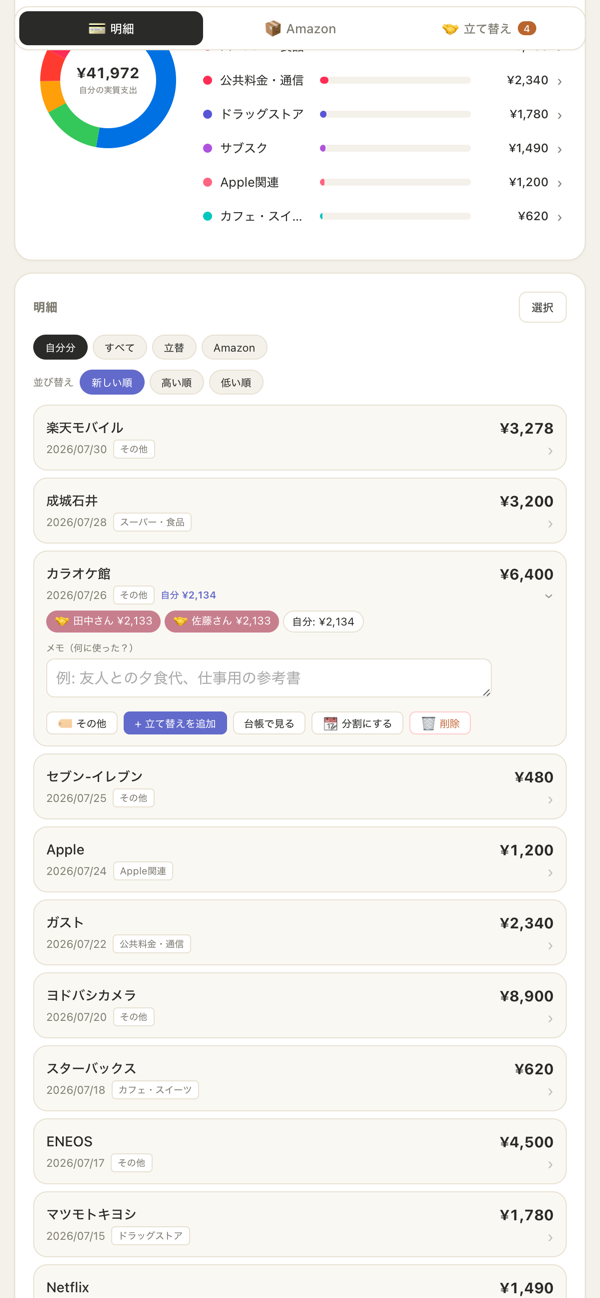
クレジットカードの明細CSVを読み込むだけで、支出をカテゴリ別に自動集計。友人との立て替えや分割払いも切り分けて、「自分の実質支出」がひと目で分かります。Just import your credit card statement as a CSV, and spending is grouped by category automatically. It separates out costs you've covered for friends and installment payments, so you can see what you actually spent at a glance.
制作の背景BACKGROUNDBackground制作の背景
毎月クレカの明細が届いても、金額が並んでいるだけで『結局いくら使ったのか』『どれが立て替えで、どれが自分の分か』が分からずモヤモヤしていました。表計算で仕分けるのも長続きしない。
その“明細の見えなさ”を解消するために、このアプリをつくりました。CSVを放り込むだけで、立て替えを差し引いた「自分の実質支出」と前月比まで自動で出る——判断に必要な数字だけが残るように、と考えて形にしました。Every month the card statement arrived, but it was just a list of amounts. I could never tell how much I had really spent, or which charges were covering for someone else and which were my own, and it always left me uneasy. Sorting them in a spreadsheet never lasted.
I built this app so that statements would finally make sense. Just drop in the CSV, and it works out your actual spending, minus what you covered for others, and even the change from last month. The aim was to leave only the numbers you need to make decisions.
プレビューPREVIEWPreviewプレビュー
スマホ版iPhoneMobileスマホ版
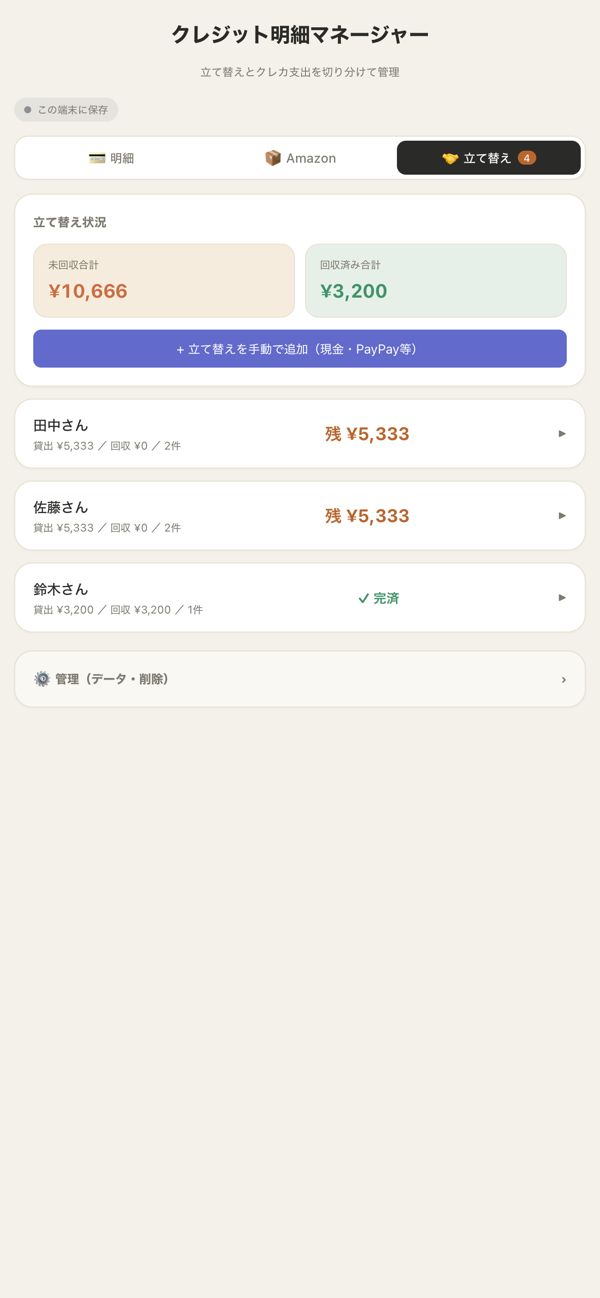
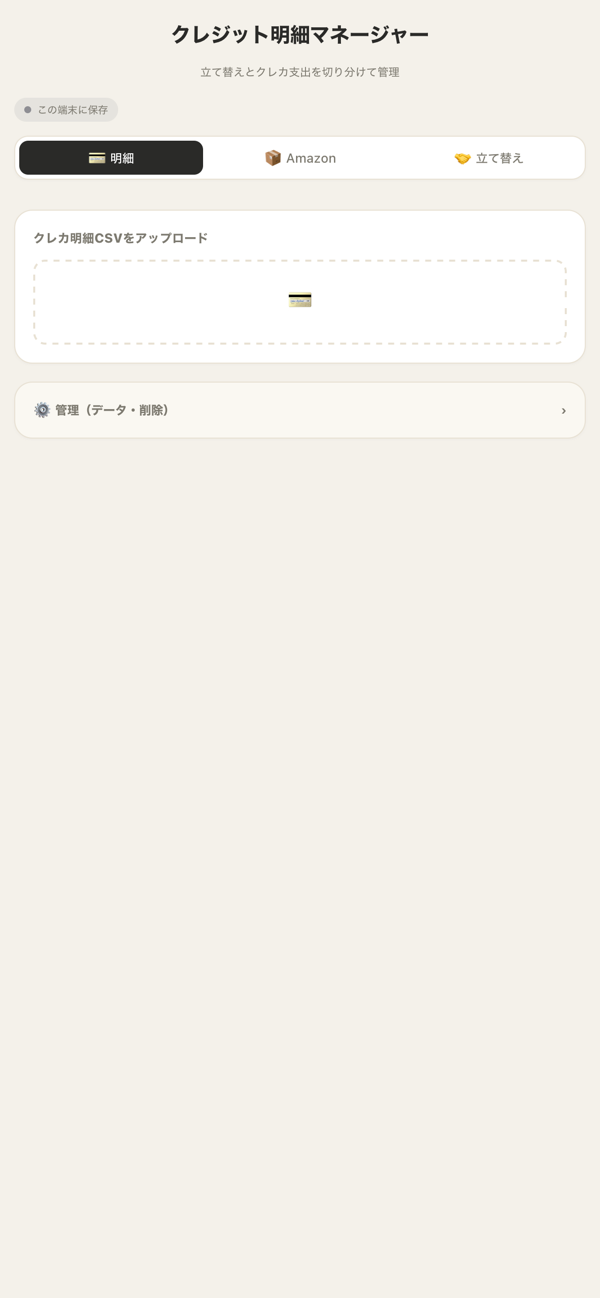
PC版DesktopDesktopPC版
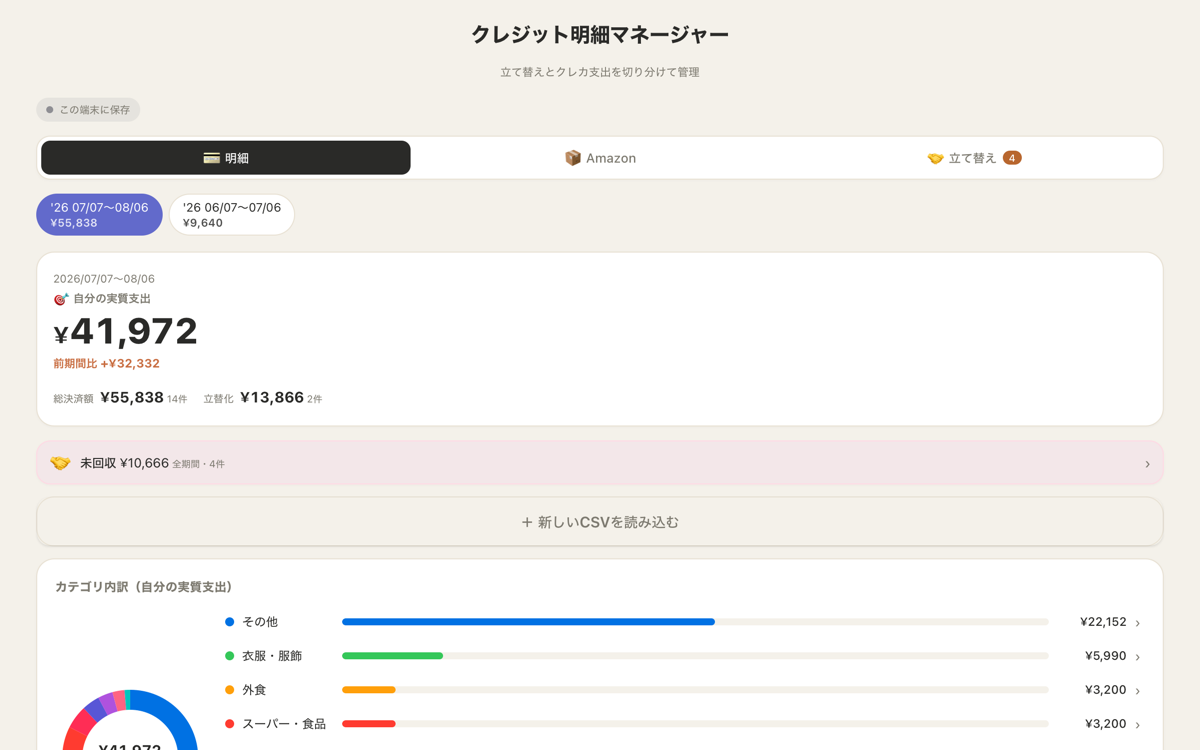
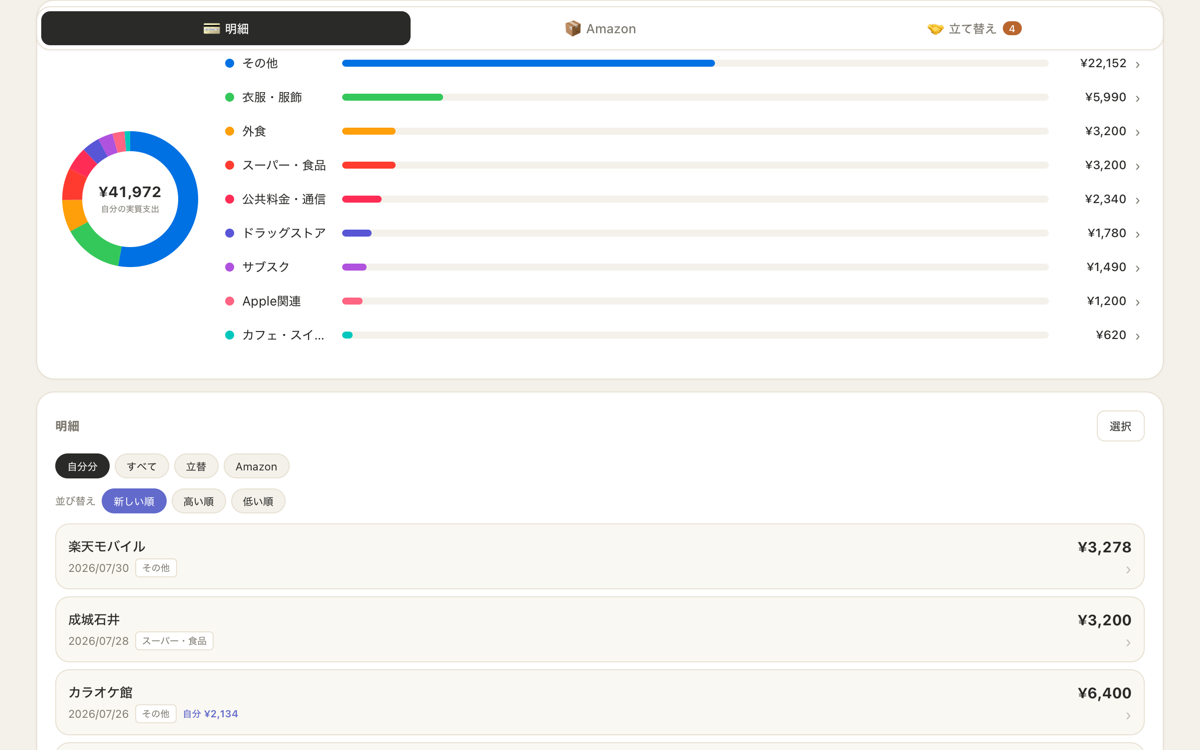
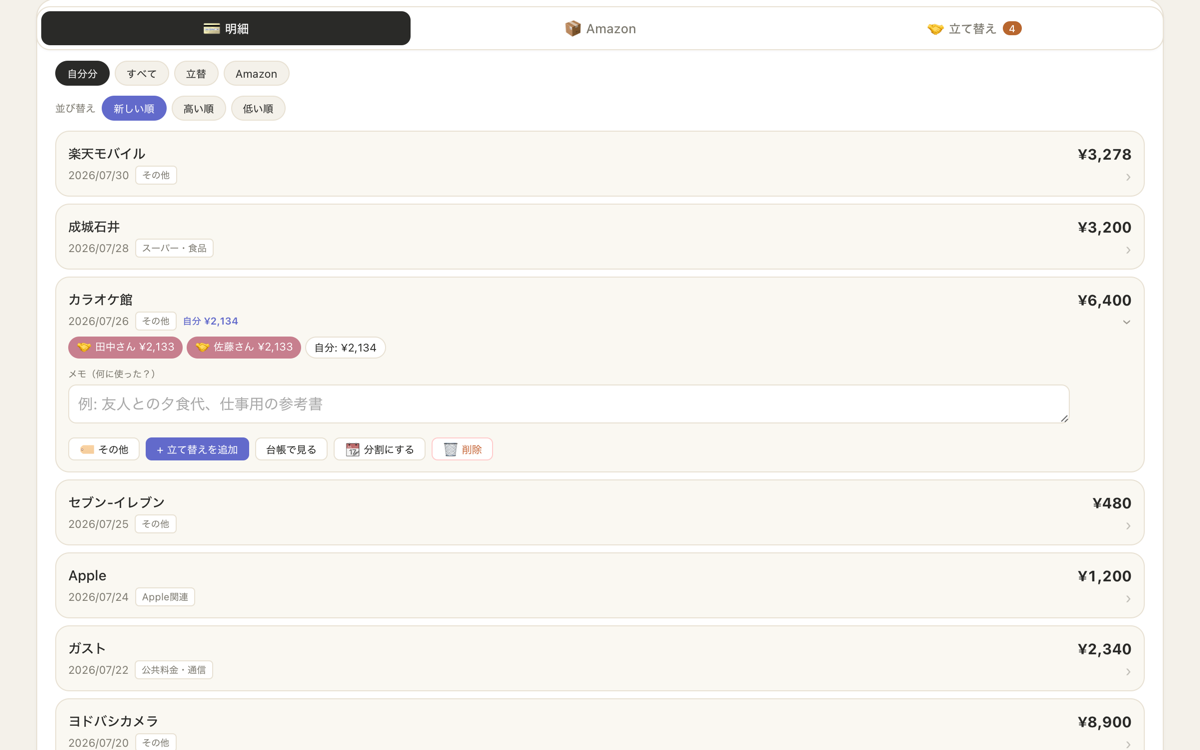
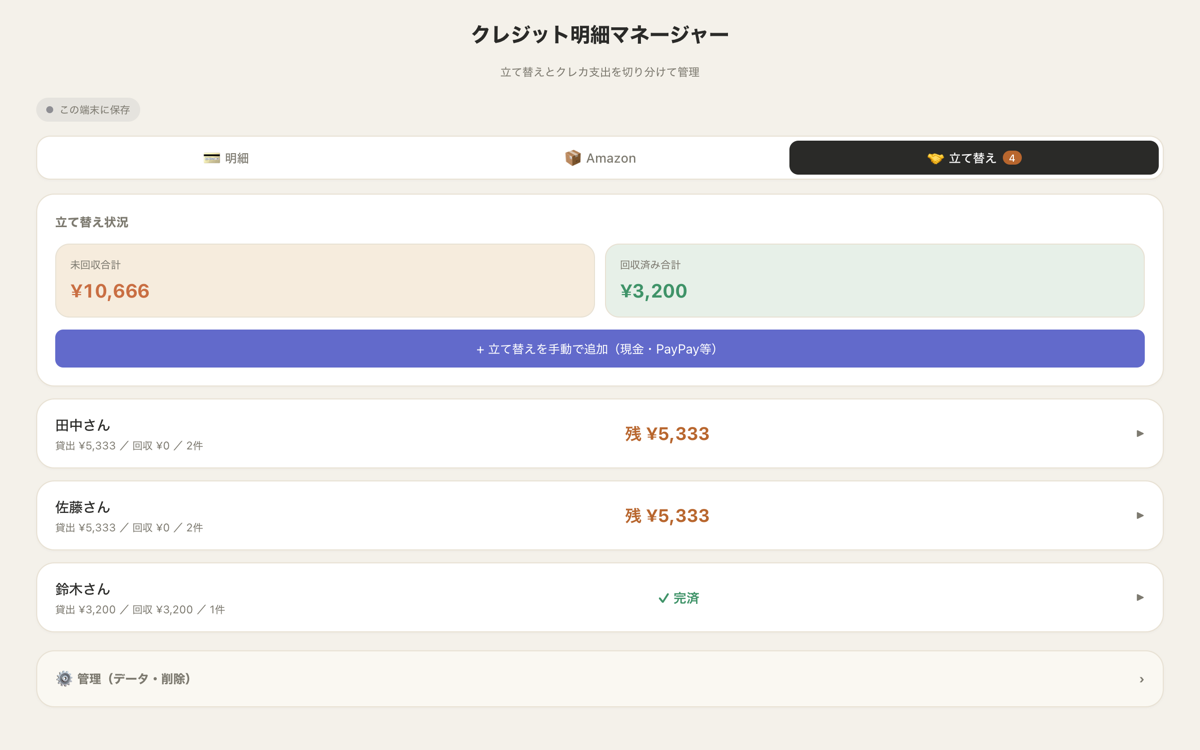
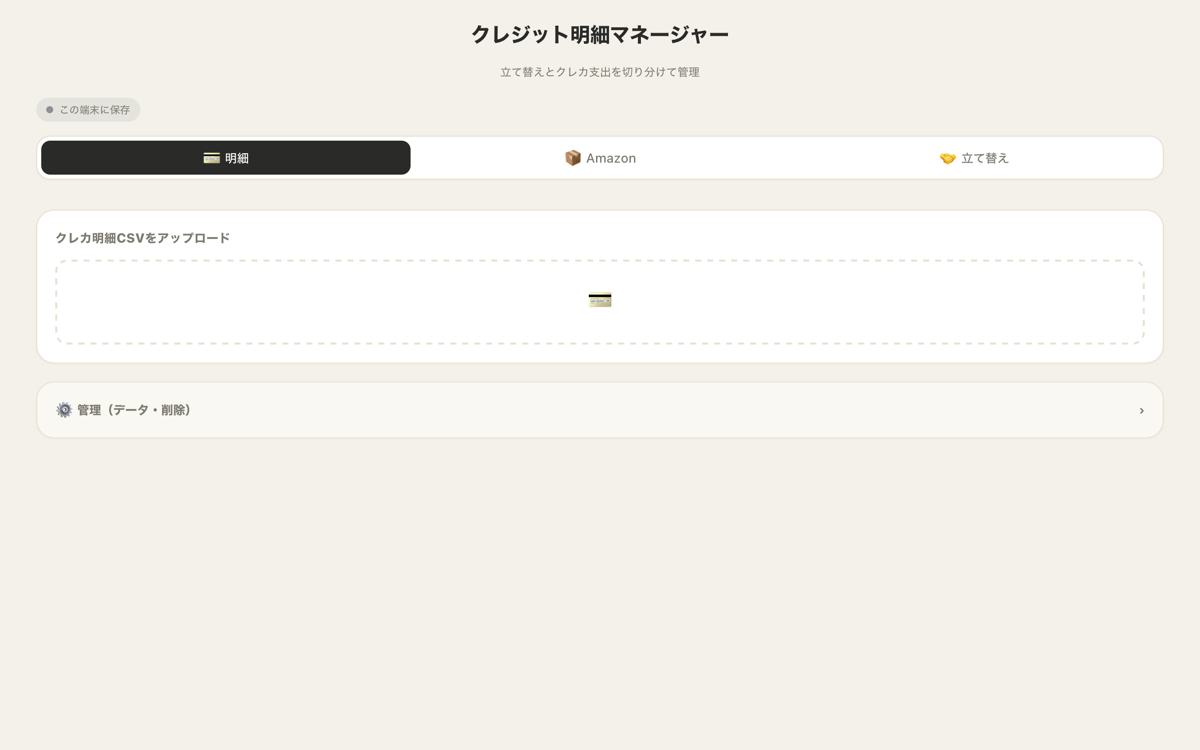
実際の画面です。掲載しているデータは、動作確認用のサンプル明細です(実在の利用明細ではありません)。Actual screens. The data shown is a sample statement created for testing (not a real card statement).
くわしくSTORYThe Storyくわしく
こんな場面でSITUATIONSituationこんな場面で
毎月クレジットカードの明細が届くが、金額の羅列でしかない。A credit card statement arrives every month, but it's nothing more than a list of amounts.
困っていたことTASKChallenge困っていたこと
総額は分かっても「自分が実質いくら使ったか」が見えない。立て替えや分割が混ざり、手作業の仕分けは続かない。You can see the total, but not how much you actually spent yourself. Shared costs and installments are mixed in, and sorting by hand never lasts.
アプリがすることACTIONSolutionアプリがすること
明細CSVを読み込むと、カテゴリ別に自動集計。立て替え・分割を切り分け、「自分の実質支出」と前月比まで自動で出す。Import the statement CSV and it totals your spending by category automatically. It separates out shared costs and installments, then shows your actual spending and the change from last month.
こう変わるRESULTResultこう変わる
「今月いくら使ったか」がひと目で分かり、家計の判断が速くなる。You can see this month's spending at a glance and make household budget decisions faster.
情報INFORMATIONInformation情報

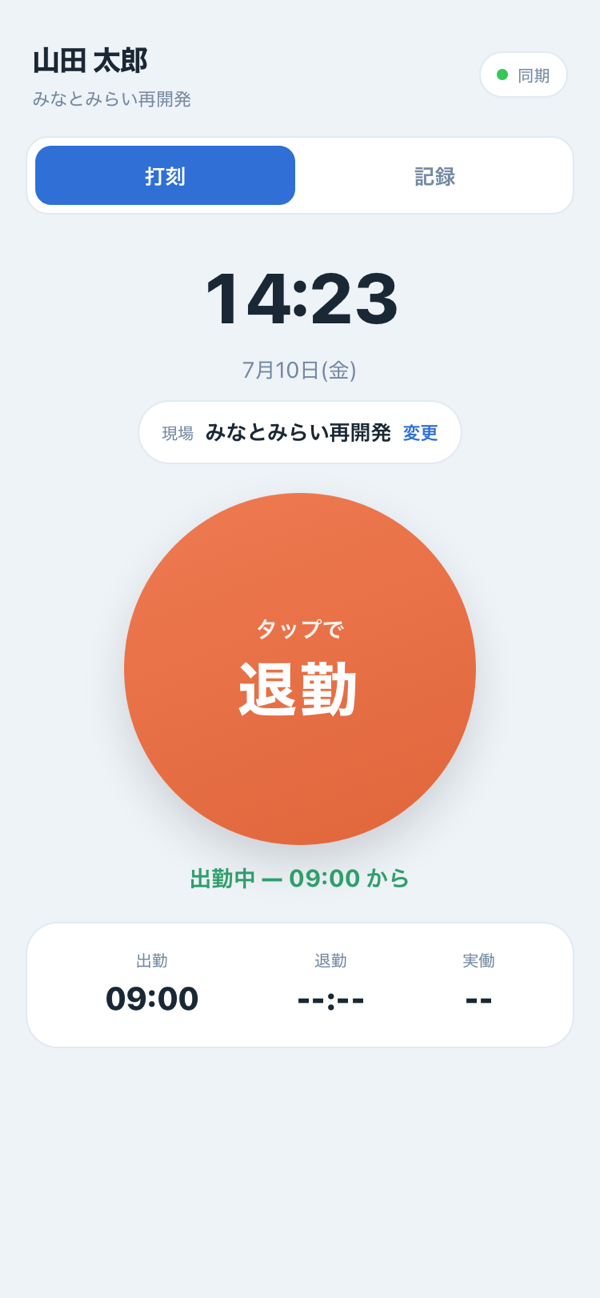
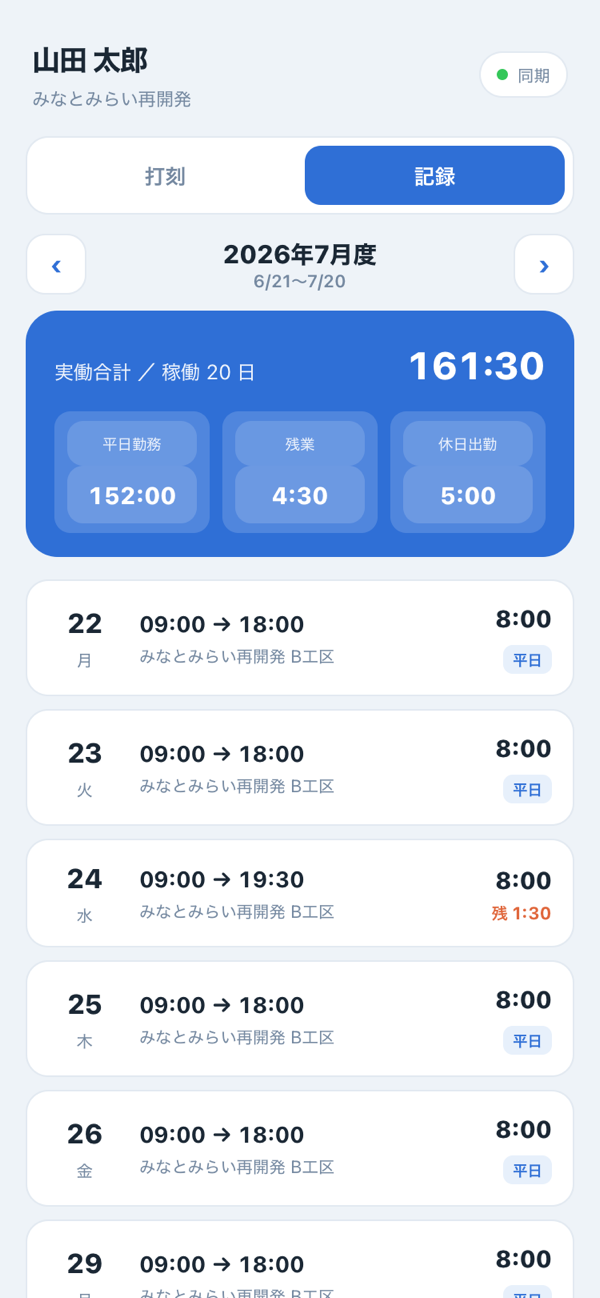
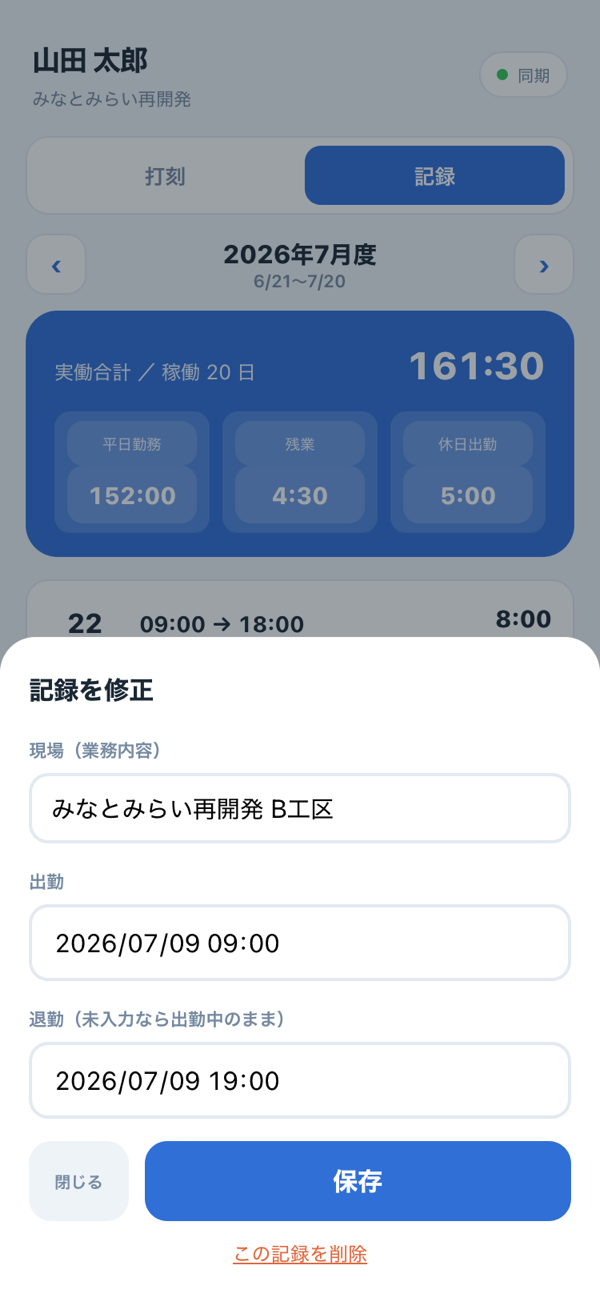
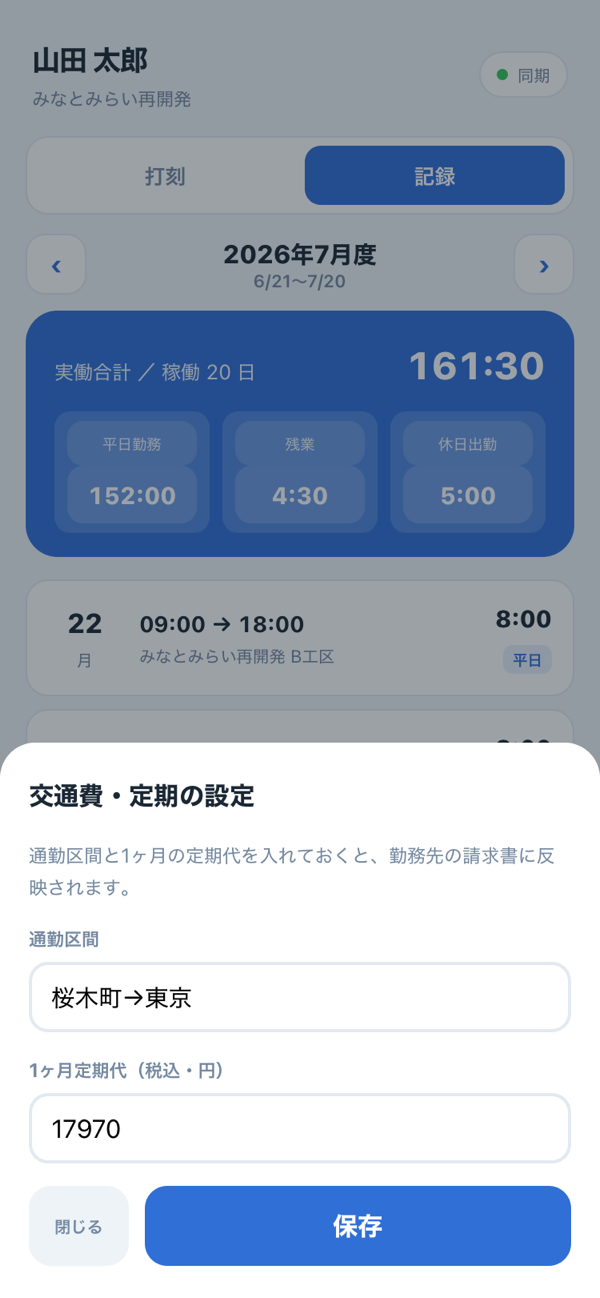
派遣で働く人のための打刻アプリ。出勤・退勤を大きなボタンでタップするだけ。自分の勤務記録や月の合計、交通費・定期もそのまま残せます。打刻はクラウドで会社と共有されるので、紙のタイムシートも、月末の報告もいりません。A time clock app for people working through staffing agencies. Clocking in and out is just a tap on a big button. It also keeps your work history, monthly totals, and commuting costs and passes. Every punch is shared with the company through the cloud, so there are no paper timesheets and no end-of-month reports.
 対になる管理者アプリCompanion app for managers打刻管理 — 集計・勤務表・書き出しTime Clock Admin — totals, timesheets, exports
制作の背景BACKGROUNDBackground制作の背景
派遣の現場では、紙のタイムシートに手書きして、月末にまとめて提出——という流れになりがちです。書き忘れや、あとから「あの日、何時までだっけ?」の思い出し作業も、地味な負担でした。
その「打刻がめんどう」を消すために、打刻は生まれました。大きな出勤・退勤ボタンをタップするだけ。15分丸めや休憩・残業・休日出勤も自動で計算され、自分の勤務記録がいつでも見られます。交通費や定期も登録でき、会社(管理者)へはクラウドで自動共有。集計は「打刻管理」側にまるごと引き継がれます。On staffing assignments, the usual routine is to fill in paper timesheets by hand and hand them all in at the end of the month. Forgetting to write things down, and later trying to remember “What time did I finish that day?”, added up to a quiet but real burden.
Time Clock was created to take the hassle out of clocking in. Just tap the big clock-in and clock-out buttons. 15-minute rounding, breaks, overtime and holiday work are all calculated automatically, and you can check your own work history anytime. You can register commuting costs and passes too, and everything is shared automatically with the company (the manager) through the cloud. All totals carry straight over to Time Clock Admin.
プレビューPREVIEWPreviewプレビュー
スマホ版iPhoneMobileスマホ版
PC版DesktopDesktopPC版
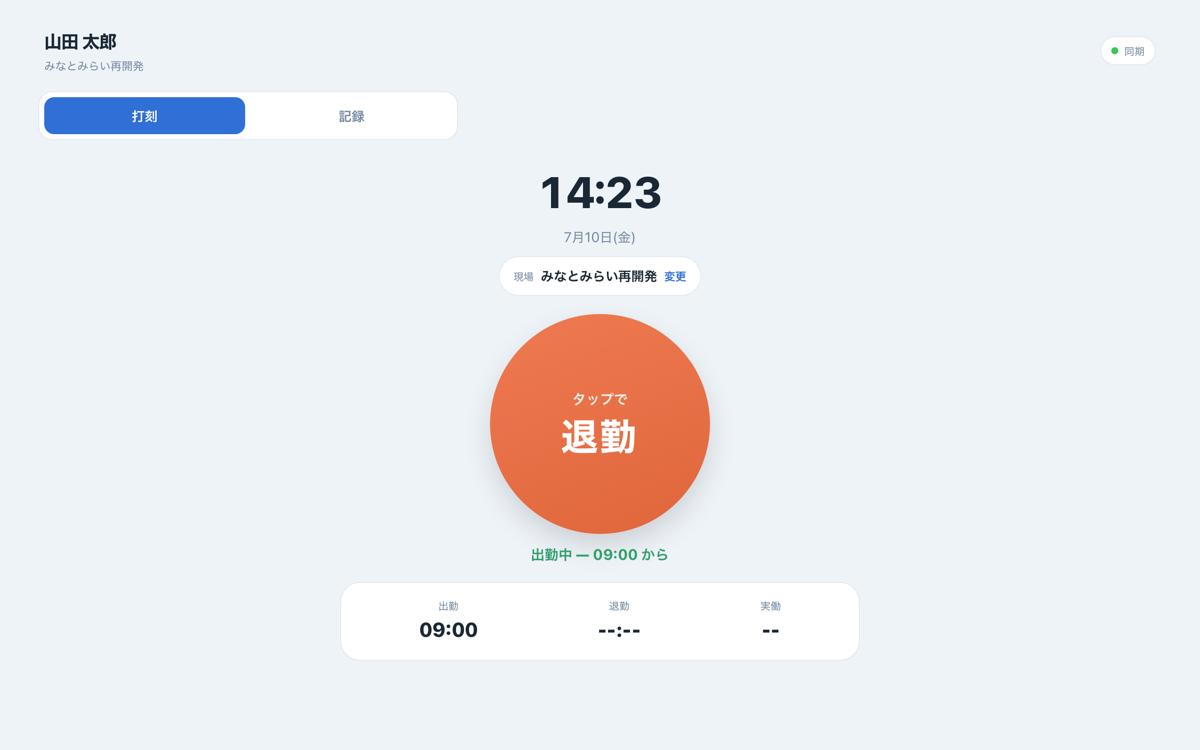
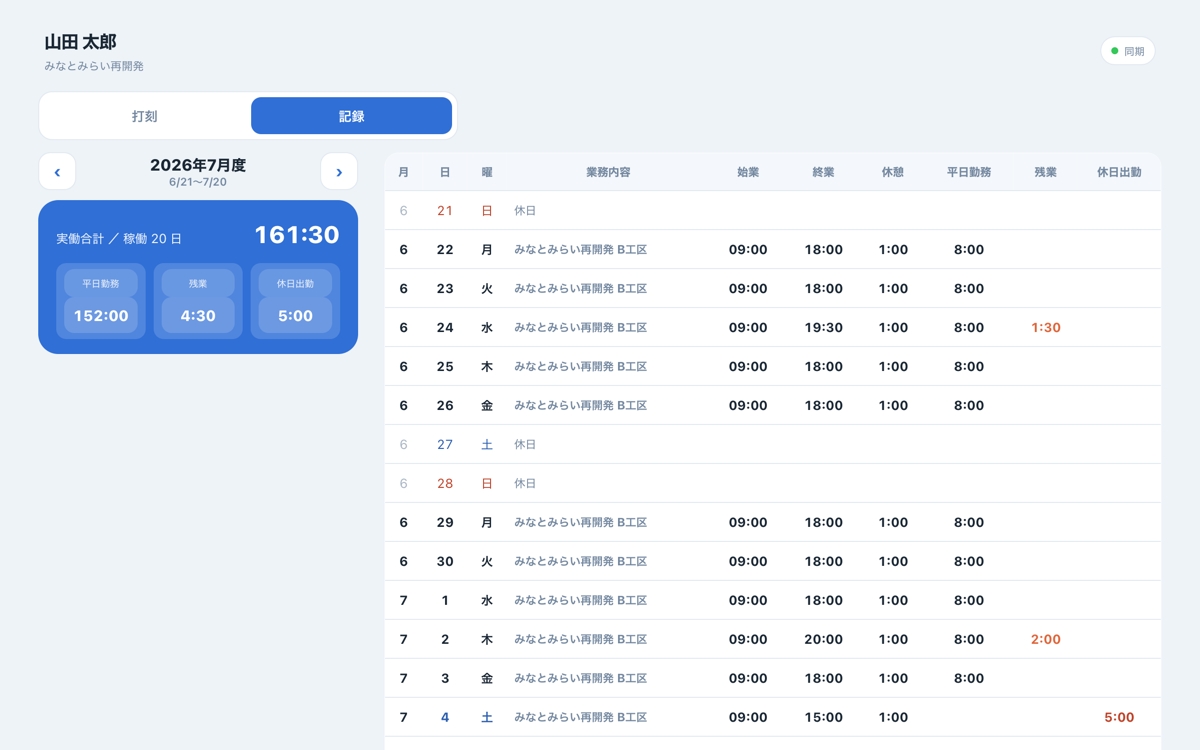
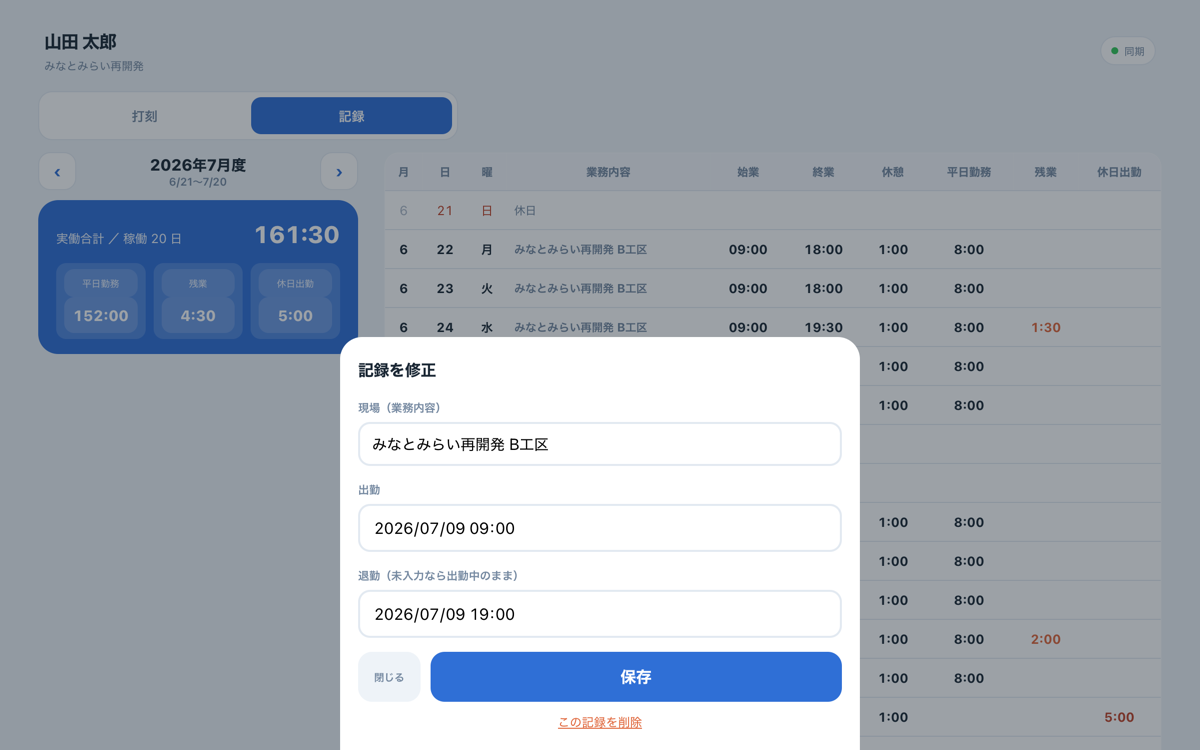
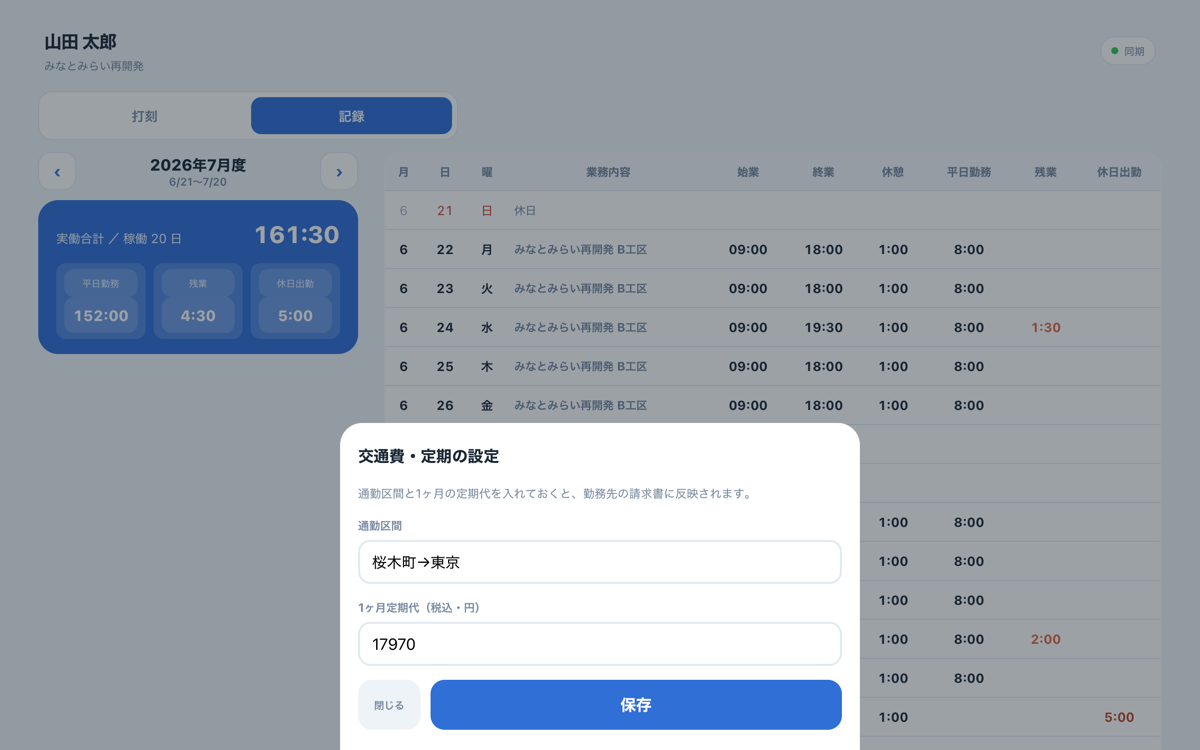
実際の「打刻」(労働者用)の画面です。掲載データはサンプルで、実在の従業員・勤怠ではありません。Actual screens from Time Clock (for workers). The data shown is sample data, not real employees or attendance records.
くわしくSTORYThe Storyくわしく
こんな場面でSITUATIONSituationこんな場面で
派遣で複数の現場に入り、日々の出退勤を自分で記録して会社に報告する必要がある。Working through a staffing agency across several sites, and needing to record your own daily hours and report them to the company.
困っていたことTASKChallenge困っていたこと
紙やメモだと書き忘れ・思い出し作業が起きる。休憩や残業の計算もあいまいで、月末の報告がめんどう。With paper or notes, entries get forgotten and hours have to be pieced together from memory. Break and overtime calculations are fuzzy, and end-of-month reporting is a chore.
アプリがすることACTIONSolutionアプリがすること
出勤・退勤をタップするだけ。実働・残業・休日出勤を自動計算し、月の合計も一目で。交通費・定期も登録でき、打刻はクラウドで会社と共有されます。Clocking in and out is just a tap. Actual hours, overtime and holiday work are calculated automatically, with monthly totals at a glance. Commuting costs and passes can be registered too, and every punch is shared with the company through the cloud.
こう変わるRESULTResultこう変わる
「打刻がめんどう」がなくなり、報告いらず。自分の勤務も、数字でいつでも確認できる。No more clock-in hassle, and no reports to write. Your own hours are always there to check, in clear numbers.
情報INFORMATIONInformation情報
「こういうの、うちにも欲しい」と思ったら。あなたの“ちょっと困った”に合わせて、専用のアプリをお作りします。初回のご相談は無料です。If you find yourself thinking, “We could use something like this,” I'll build an app tailored to your own everyday snags. Your first consultation is free.
無料で相談する→Get a free consultation→
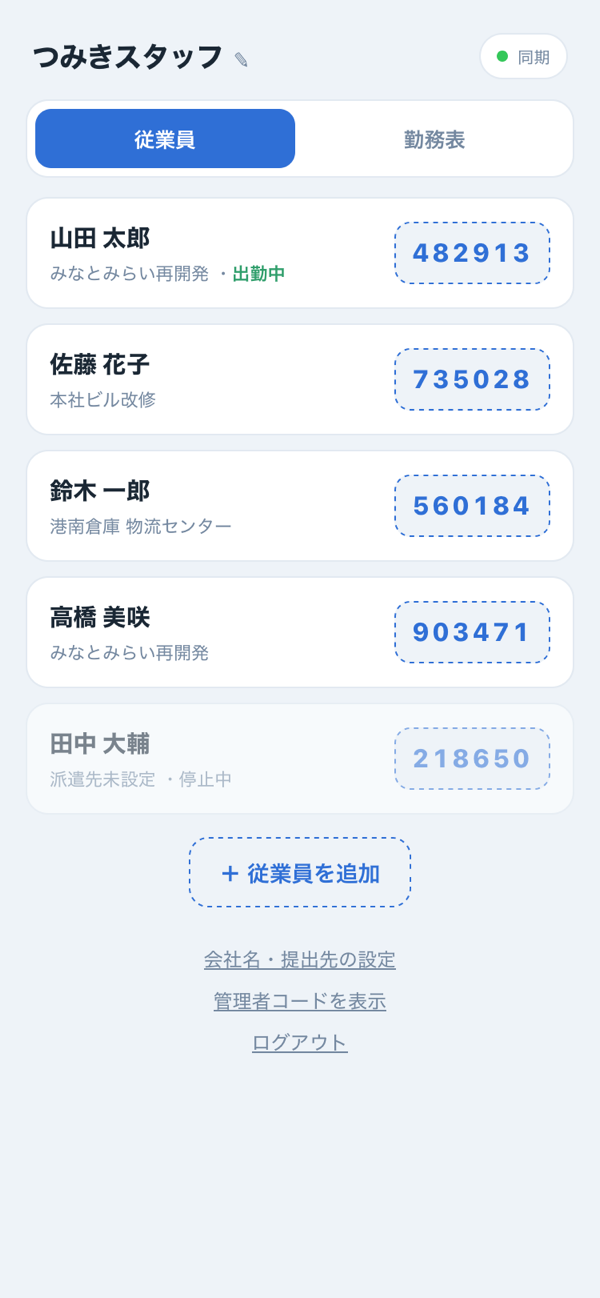
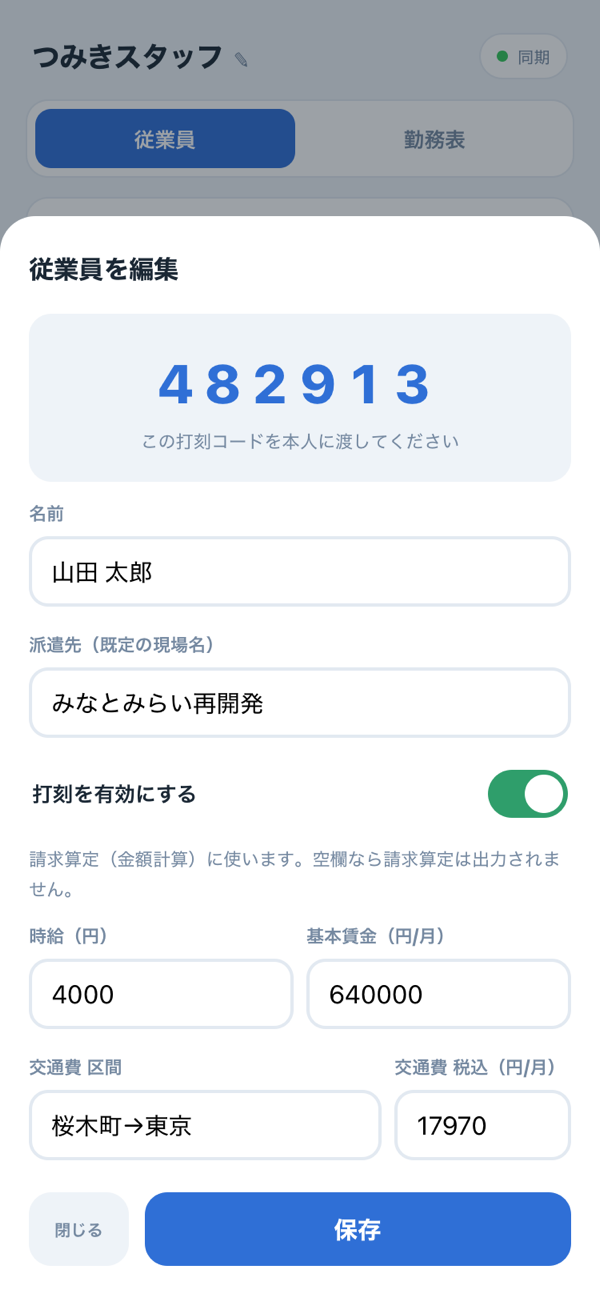
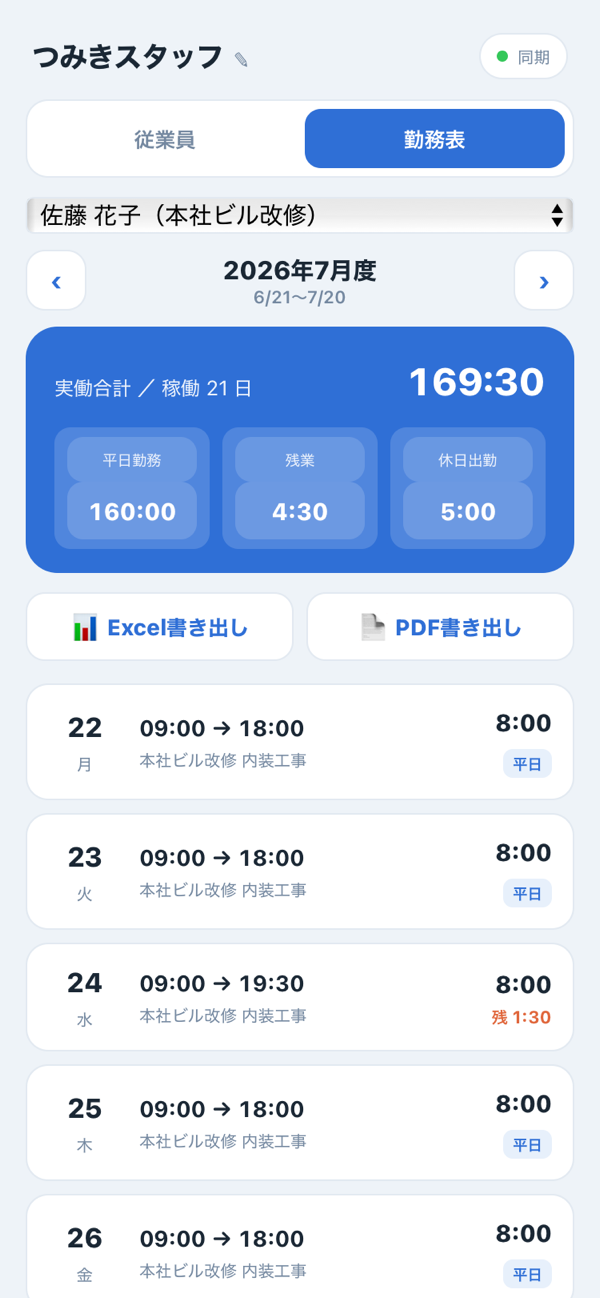
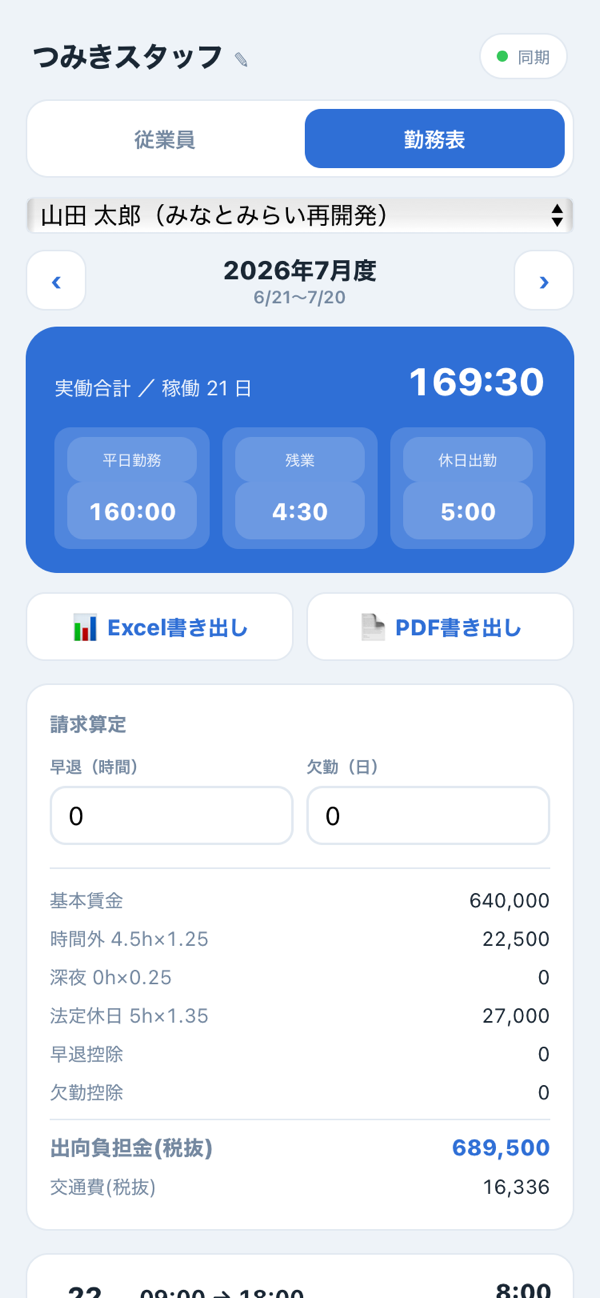
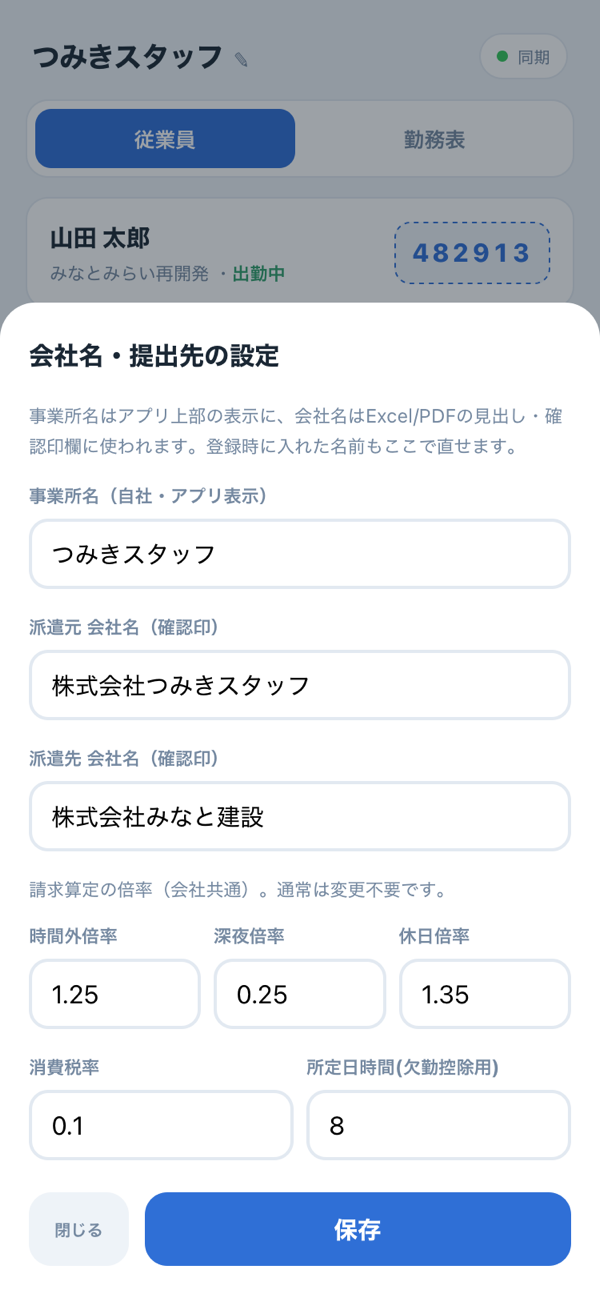
派遣会社(管理者)のための集計アプリ。従業員ごとに打刻コードを発行すれば、あとは全員の打刻がクラウドに集まります。月度の勤務表を自動集計し、派遣の勤怠管理表(Excel/PDF)や請求算定まで、そのまま書き出せます。A timesheet and totals app for staffing agencies (managers). Issue a clock-in code to each employee, and everyone's punches are collected in the cloud. Monthly timesheets are totaled automatically and can be exported as they are, from staffing attendance reports (Excel / PDF) to billing calculations.
対になる労働者アプリCompanion app for workers打刻 — 現場で出勤・退勤をタップTime Clock — tap to clock in and out on site
制作の背景BACKGROUNDBackground制作の背景
派遣の勤怠は、スタッフごと・現場ごとにバラバラの紙が集まり、転記して、集計して、提出書類に清書して……と、月末の締めが重い作業でした。数字のずれや計算ミスも起きやすいところです。
その「集計と提出書類づくり」をまるごと引き受けるのが、打刻管理です。従業員に打刻コードを配るだけで、全員の出退勤がクラウドに集約。15分丸め・休憩・残業・休日出勤・深夜まで自動計算し、勤務表からExcel/PDFの提出書類と請求算定まで一気に書き出せます。確認印欄や派遣元・派遣先の会社名にも対応しています。Staffing attendance used to mean a pile of separate paper sheets from every staff member and every site — transcribing, totaling, and writing out clean copies for submission. Closing out the month was heavy work, and it was easy for figures to drift or calculations to go wrong.
Time Clock Admin takes over the totaling and the paperwork entirely. Just hand out clock-in codes, and everyone's hours are gathered in the cloud. 15-minute rounding, breaks, overtime, holiday work and late-night hours are all calculated automatically, and from the timesheet you can export Excel / PDF submission documents and billing calculations in one go. It also supports approval-stamp fields and the names of both the staffing agency and the client company.
プレビューPREVIEWPreviewプレビュー
スマホ版iPhoneMobileスマホ版
PC版DesktopDesktopPC版
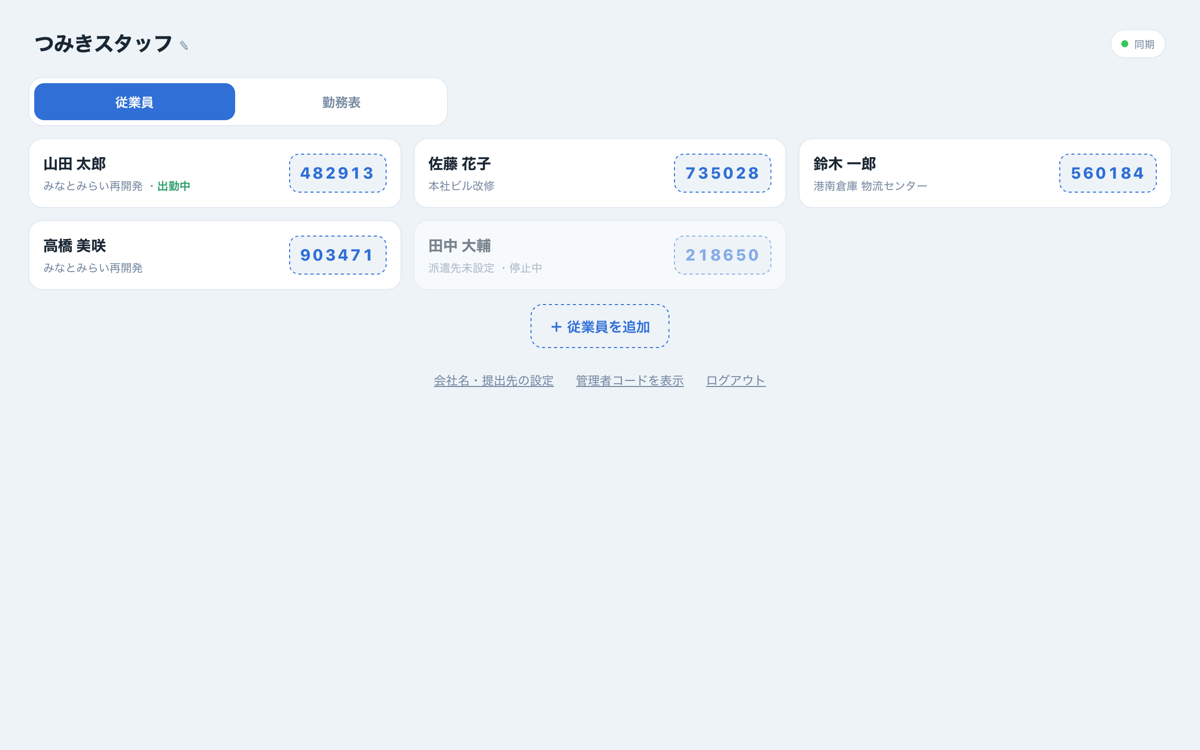
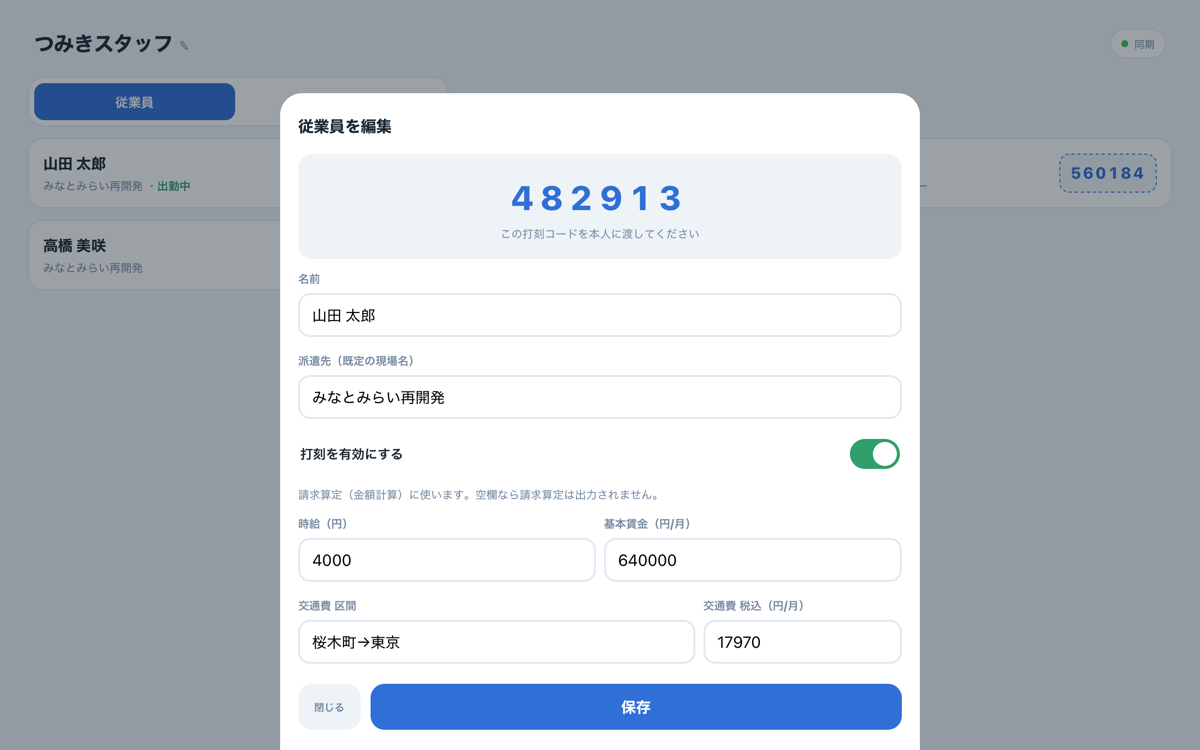
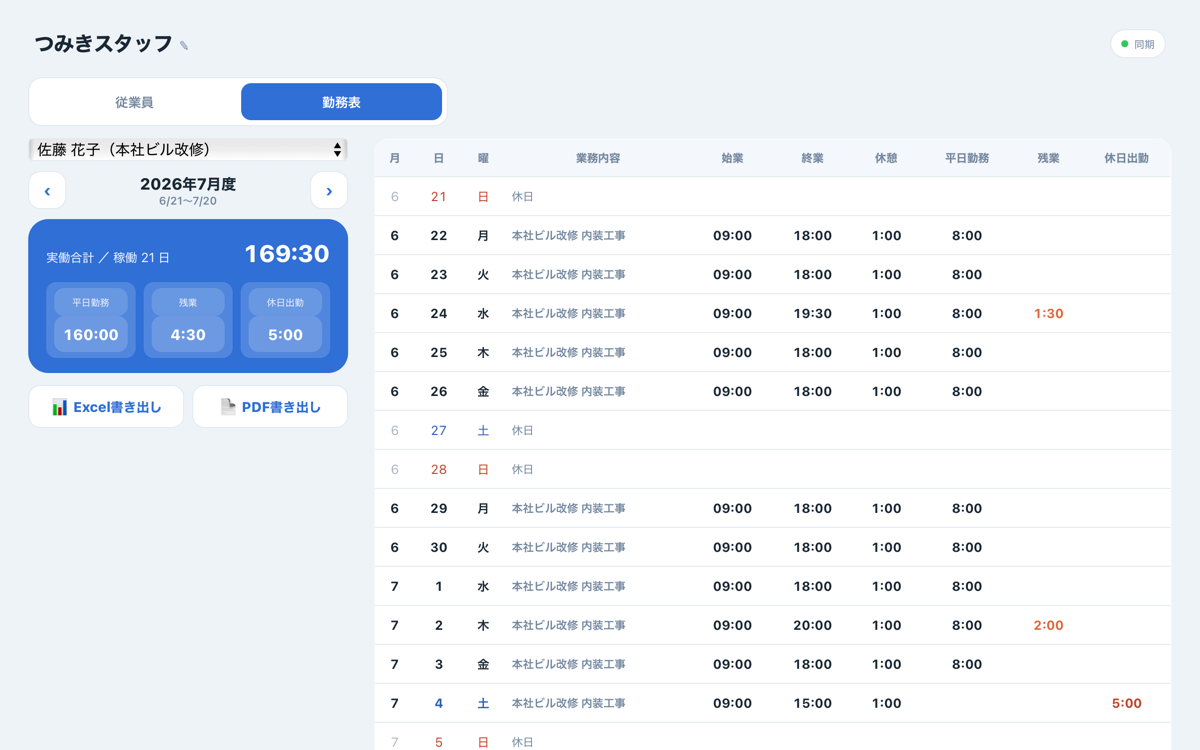
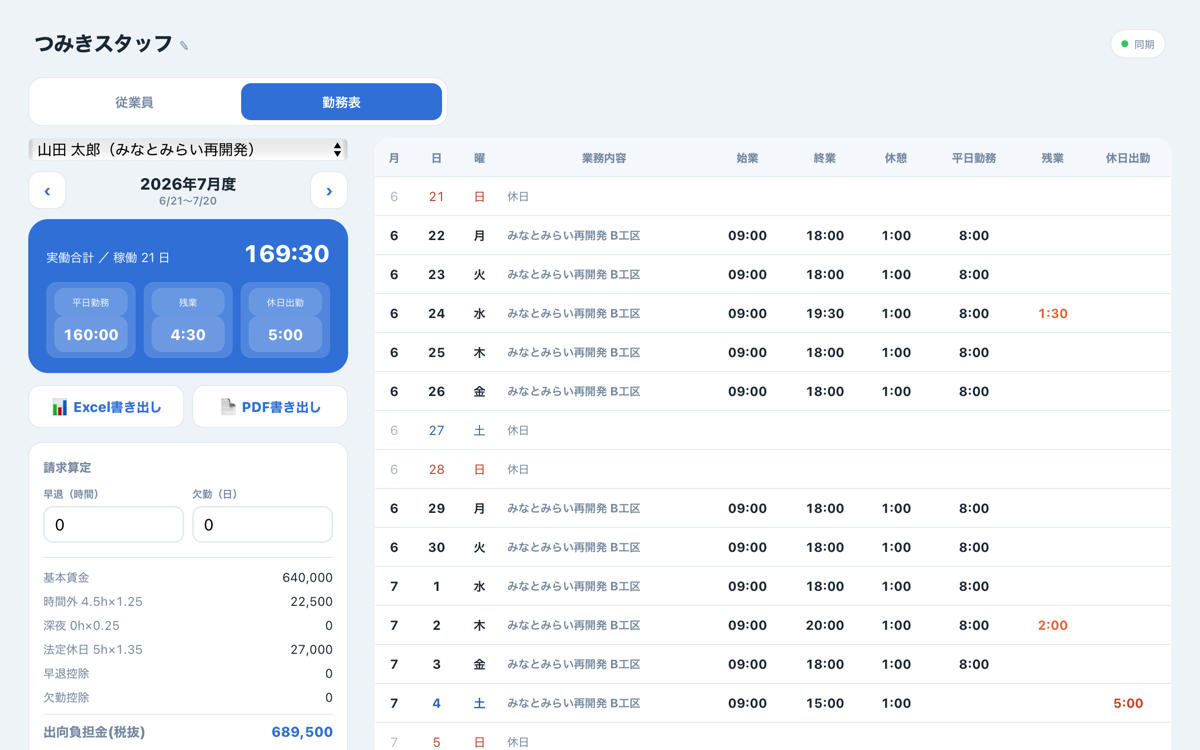
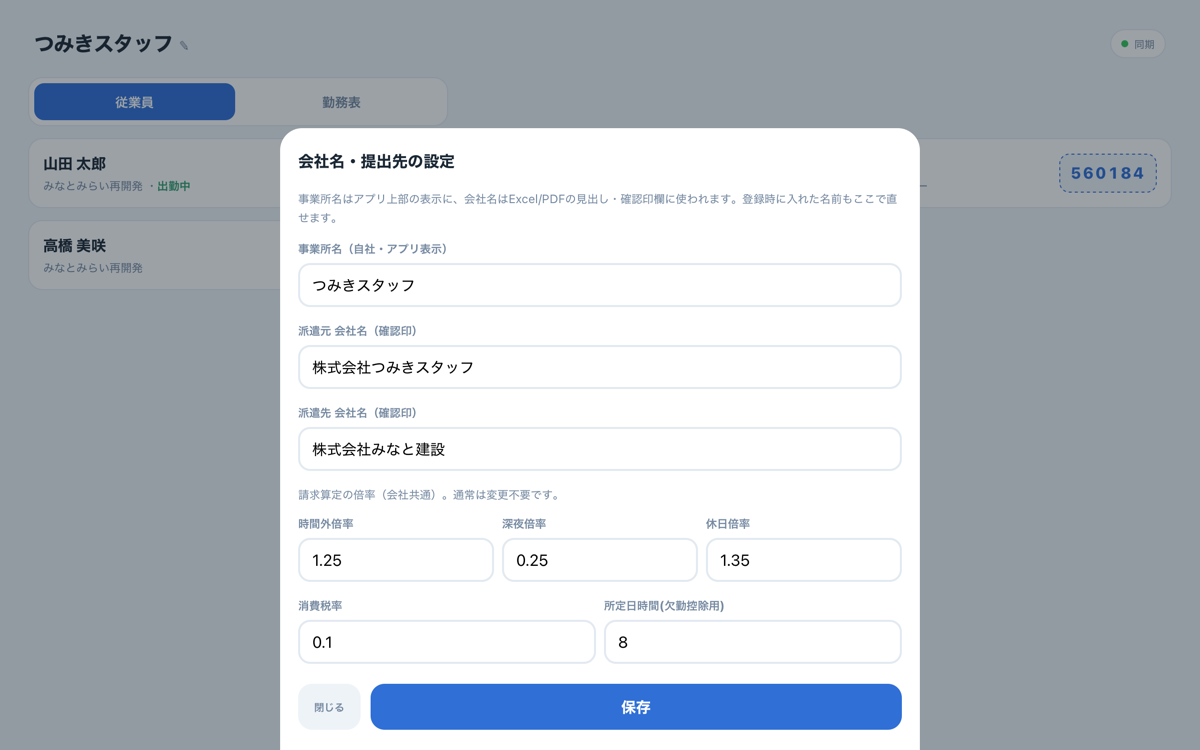
実際の「打刻管理」(管理者用)の画面です。掲載データはサンプルで、実在の従業員・勤怠ではありません。Actual screens from Time Clock Admin (for managers). The data shown is sample data, not real employees or attendance records.
書き出したPDFOUTPUTExported PDF書き出したPDF
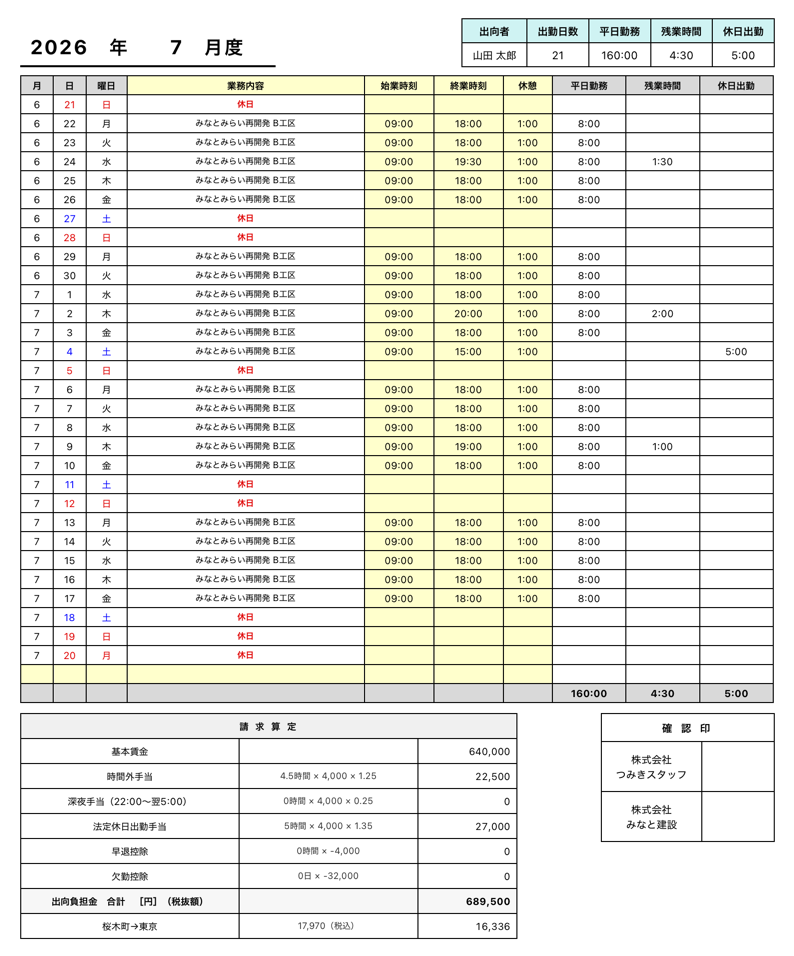
「PDFで書き出し」を押すと、この提出書類がそのまま出ます。勤務表・請求算定・確認印(派遣元/派遣先)まで1枚に。掲載はサンプルデータです。Press “Export PDF” and this submission document is produced as is, with the timesheet, billing calculations and approval stamps (agency / client) all on one page. The example uses sample data.
くわしくSTORYThe Storyくわしく
こんな場面でSITUATIONSituationこんな場面で
複数のスタッフを複数の現場に派遣し、毎月それぞれの勤怠をまとめて提出書類にする必要がある。Dispatching several staff members to several sites, and compiling each person's attendance into submission documents every month.
困っていたことTASKChallenge困っていたこと
紙の集計・転記でミスが起きやすく、締めのたびに時間が溶ける。請求のための計算も手作業になりがち。Totaling and transcribing on paper invites mistakes, and every month-end close swallows hours. Billing calculations tend to be done by hand, too.
アプリがすることACTIONSolutionアプリがすること
従業員にコードを配るだけで打刻がクラウドに集約。勤務表を自動集計し、提出書類(Excel/PDF)と請求算定まで書き出せます。確認印・派遣元/派遣先の会社名にも対応。Just hand out codes to employees and every punch is collected in the cloud. Timesheets are totaled automatically and can be exported as submission documents (Excel / PDF) along with billing calculations. Approval stamps and agency / client company names are supported.
こう変わるRESULTResultこう変わる
転記も清書もゼロに。締めが「選んで書き出す」だけになり、提出までの時間が大きく縮む。No more transcribing or rewriting. Closing the month becomes a matter of “select and export,” greatly shortening the time to submission.
情報INFORMATIONInformation情報
「こういうの、うちにも欲しい」と思ったら。あなたの“ちょっと困った”に合わせて、専用のアプリをお作りします。初回のご相談は無料です。If you find yourself thinking, “We could use something like this,” I'll build an app tailored to your own everyday snags. Your first consultation is free.
無料で相談する→Get a free consultation→つみきの特長Why TsumikiFEATURESつみきの特長
あなたの会社の業務を1〜2時間じっくり伺って、その会社だけの専用アプリを作ります。I spend one to two hours listening closely to how your business works, then build an app made just for your company.
仕事のやり方は、そのまま。道具のほうを合わせます。Keep the way you work. The tool adapts to you.
オーダーメイドだからできる、6つのお約束OUR PROMISESSix Promises Only a Custom Build Can Makeオーダーメイドだからできる、6つのお約束
見出しを押すと、それぞれの詳しい中身とイラストが開きます。Tap a heading to see the details and an illustration.
FEATURE 01 あなた専用に、鍵つきでお渡しDelivered to you alone, with its own key
あなたのために作ったアプリを、あなた専用の鍵(=プロダクトキー。合言葉のようなもの)でお渡しします。無断でコピーされたり、同業に横流しされたりしません。(ご希望の方には、ソースコードのお渡し=買い取りもご相談に応じます)The app built for you is delivered with a key that belongs to you alone (a product key, which works much like a passphrase). It won't be copied without your permission or passed on to others in your industry. (If you'd like to receive the source code as a buyout, that can be discussed as well.)
FEATURE 02 道具のほうを、仕事に合わせるThe tool fits your work, not the other way around
いまの手順は、そのままで大丈夫。慣れたやり方を変えずに、道具の側をぴったり合わせて作ります。Your current process can stay exactly as it is. Instead of changing the way you're used to working, I build the tool to fit it precisely.
FEATURE 03 無断コピー・横流しを防ぐProtected against copying and resale
アプリはあなた専用の鍵つき。使える端末数の制限と「◯◯さま専用」の印で守ります。万一よそに出回っても、その鍵だけ止める(=失効させる)ことができます。Every app is locked to your own key. It's protected by a limit on the number of devices and a “Licensed to [your name]” mark. If it ever turns up somewhere it shouldn't, that key alone can be switched off (revoked).
FEATURE 04 着手後、金額は増えないThe price won't grow once work begins
ご納得いただいた金額で着手し、あとから膨らむことはありません。ヒアリングもお見積りも無料です。Work begins at a price you've agreed to, and it won't swell later. Consultations and quotes are free.
FEATURE 05 いきなり、完成させないNothing is finished in one go
まず動く形をお見せします。実際に触った感想をもとに、少しずつ整えていきます。First, I show you something that works. Then, based on how it feels when you actually use it, we refine it step by step.
FEATURE 06 伺った情報は、守るWhat you share stays protected
業務を深く伺う仕事だからこそ。ご希望に応じてNDA(秘密保持契約)も締結します。This work means learning your business in depth, which is exactly why confidentiality matters. I'm happy to sign an NDA (non-disclosure agreement) on request.
あなた専用に、守ってお渡しPROTECTED FOR YOUMade for You, Delivered Securelyあなた専用に、守ってお渡し
「よそに無断で渡らない」安心を、仕組みでお約束します。ご希望の方には、ソースコードのお渡し(=買い取り・著作権譲渡)もご相談に応じます。Peace of mind that your app won't end up anywhere without your permission — built into the system, not just promised. If you'd like, the source code can also be handed over (a buyout with transfer of copyright).
既製ツールとの違いVS SUBSCRIPTION TOOLSHow It Compares to Off-the-Shelf Tools既製ツールとの違い
既製のツールOff-the-shelf tools
- 自社の手順に、合わないDon't match your own process
- 使わない機能にも、毎月払うMonthly fees, even for features you never use
- 人が、やり方を覚え直すPeople have to relearn how to work
- 結局、表計算に戻るYou end up back in spreadsheets
つみきのオーダーメイドCustom-built by Tsumiki
- 手順に合わせて、作るBuilt around your process
- 必要な機能だけOnly the features you need
- 覚え直しは、なしNothing to relearn
- 業務に、そのまま入るFits right into your work
3つの違いを、くわしくThe three differences, in detail IN DETAIL3つの違いを、くわしく
既製のサブスク型ツールと、つみきのオーダーメイド。迷ったときの判断材料に、3つの違いを正直にまとめました。Subscription tools versus custom-built apps from Tsumiki. To help you decide, here is an honest look at three key differences.
買い切りだから、続く費用がかからないA one-time purchase, so no ongoing costs
サブスクは使い続けるかぎり、毎月・毎年の支払いが続きます。つみきは一度お渡ししたら月額なし。長く使うほど、差は開いていきます。With a subscription, you keep paying every month or every year for as long as you use it. With Tsumiki, once the app is delivered there are no monthly fees. The longer you use it, the wider the gap grows.
オーダーメイドだから、いまのやり方に乗るCustom-built, so it fits the way you already work
既製ツールは多機能でも“あなたの業務にちょうど”ではなく、結局ツールに合わせて手順を変えがち。つみきはいまのやり方に合わせて作るので、余計な操作がありません。Off-the-shelf tools may be packed with features, but they're rarely a perfect fit for your business, and you often end up changing your process to suit the tool. Tsumiki builds around the way you work now, so there are no unnecessary steps.
データが、あなたの手元に残るYour data stays with you
多くのサービスはデータを預ける前提。つみきのアプリはお手元のブラウザの中で動き、プロダクトキーでお渡しします。あなたの情報が、外に出ていきません。Many services assume you'll hand your data over to them. Tsumiki apps run in your own browser and are delivered with a product key. Your information never leaves your hands.
ひと目でAT A GLANCEAt a Glanceひと目で
※ サブスク型にも、常に最新・大規模チームでの共同利用に強いといった良さがあります。小さく確実に・費用を抑えて、が合う方につみきは向いています。Note: Subscription tools have real strengths of their own, such as always being up to date and supporting collaboration across large teams. Tsumiki is a good fit if you want something small, dependable and cost-effective.
「うちのこれ、なんとかなりますか?」だけで大丈夫です。初回のヒアリングは無料です。Simply asking, “Could you help with this?” is all it takes. Your first consultation is free.
無料で相談する→Get a free consultation→プロフィールProfilePROFILEプロフィール
「これ、なんとかならないかな」——その一言がうれしくて、小さなアプリを作っています。作るのは私ひとりなので、先にどんな人間かをお伝えしておきます。“Isn't there some way to fix this?” — I love hearing those words, and they're why I build small apps. Since I'm the only one doing the building, I'd like you to know a little about who I am first.

ごあいさつHelloGREETINGごあいさつ
はじめまして!
私は髙橋弘大(たかはしこうだい)といいます。
まずこちらの私のポートフォリオサイトを見てくださり、ありがとうございます。Nice to meet you!
My name is Kodai Takahashi.
Thank you for taking the time to visit my portfolio site.
私がアプリ制作を始めた理由はたった一つです。
自分の表現で周りの人を幸せにしたいからです。I started making apps for one simple reason:
I want to bring happiness to the people around me through my own way of expressing things.
社会人になってから、私は外に見せるための実績をひたすらに追いかけていました。積み上げのベクトルが他人に向いていたのだと思います。ただ、自分の人生で大きく成長をできた瞬間を振り返ると、どれも自分自身に努力、成長、達成のベクトルが向いていました。After I started my career, I spent years chasing achievements I could show to others. Looking back, my efforts were aimed outward, at other people. Yet when I think about the moments in my life when I truly grew, every one of them came when my effort, growth and achievement were aimed at myself.
いまは、内側から自分を作り上げることに集中しています。自分の本質を生きるための努力です。内側から積み上げて、結果を出します。Today, I'm focused on building myself from the inside out — working to live true to who I really am. I build from within, and I deliver results.
私にとって「成果の創出」とは、自分の表現や世界観で周りの人を幸せにすること。理想と現実の差を、少しずつ埋めていくことです。それが、ものづくりの根っこにあります。To me, “creating results” means bringing happiness to the people around me through my own expression and view of the world, and closing the gap between the ideal and reality little by little. That lies at the root of everything I make.
沢山お話を伺ってひとつひとつ積み上げていき、最終的には理想のワクワクできるアプリを制作します。I listen closely, build things up one piece at a time, and in the end create an app that is exactly what you hoped for — one that genuinely excites you.
写真展示室GalleryGALLERY写真展示室
大切にしているカメラで情景を残しておくことが好きです。ぜひご覧になってください。I love capturing scenes with a camera I treasure. I hope you enjoy them.
3つの世界Three Worlds
僕はFUJIFILMの柔らかさが好きです。写真なのにまるでそれが絵画のような。情景に柔らかさをのせて表現してくれます。I love the softness of FUJIFILM. Its photos feel almost like paintings — the camera lays a gentle softness over every scene.
水を撫でるCaressing the Water
これも柔らかさが表現できた一例。夜の渓谷で静かに流れる水を撮影しました。Another example of that softness: water flowing quietly through a valley at night.
前進Moving Forward
映画監督の細田守さんは夏の入道雲を前に進む意味として表現されると知り、その表現が好きで撮影しました。I learned that the film director Mamoru Hosoda uses summer thunderheads to express moving forward. I loved that idea, so I photographed one.
Midori
2枚組Set of 2FUJIFILMが映し出す緑が大好きです。コントラストの広さからくる植物たちの天を仰ぐ生き生きしている表情が好きです。I adore the greens FUJIFILM brings out. Thanks to its wide contrast, the plants look full of life, as if reaching up toward the sky.
その土地のシンボルSymbols of a Place
6枚組Set of 6ぐっと惹かれたモノたちの魅力を引き出して撮影がしたい。アメリカのノーベル文学賞作家ジョン・スタインベックの言葉を借りると、蝶を追って山頂にたどり着く少年でありたいです。I want to draw out the charm of the things that captivate me. To borrow the words of the American Nobel laureate John Steinbeck, I want to be the boy who chases butterflies and finds himself on the mountaintop.
「うちのこれ、なんとかなりますか?」だけで大丈夫です。初回のヒアリングは無料です。Simply asking, “Could you help with this?” is all it takes. Your first consultation is free.
無料で相談する→Get a free consultation→
事業者概要Business InfoBUSINESS事業者概要
安心してご相談いただけるよう、事業者の情報をひとつにまとめました。All the key details about the business in one place, so you can reach out with confidence.
適格請求書発行事業者(登録年月日:令和8年1月1日)T1810780400475
Registered Qualified Invoice Issuer in Japan (registered on January 1, 2026)
料金・お取引についてTERMSPricing & Terms料金・お取引について
個人情報の取り扱いは プライバシーポリシー をご覧ください。本サイトは、商品をその場で購入・決済する通信販売ではなく、ご相談・お見積りを経てご契約いただく受託開発サービスです。For how personal information is handled, please see the Privacy Policy. This site is not an online store for immediate purchase and payment; it offers custom development services, contracted after a consultation and quote. This English translation is provided for convenience; if there is any discrepancy, the Japanese version prevails.
ご不明な点は、お気軽にお問い合わせください。初回のヒアリングは無料です。If you have any questions, please feel free to get in touch. Your first consultation is free.
無料で相談する→Get a free consultation→こんな課題ありませんか?Common ChallengesISSUESこんな課題ありませんか?
お困りごと、ありますよね。法人のみなさまから、よく伺うのはこんなお話です。Chances are, some of these sound familiar. These are the challenges businesses tell me about most often.
毎日、同じ数字を別の表に打ち直している。Re-entering the same numbers into different spreadsheets, every single day.
打ち間違いに気づくのは、たいてい後になってから。直す時間まで含めると、意外と大きな仕事になっています。Typos usually aren't caught until much later. Add the time it takes to fix them, and it turns into a surprisingly large job.
必要な情報が、メール・チャット・表計算に散らばっている。The information you need is scattered across email, chat and spreadsheets.
「あれ、どこだっけ」で毎回数分。1日に何度もあると、1年ではまとまった時間になります。A few minutes lost to “Where was that again?” each time. When it happens several times a day, it adds up to a lot of time over a year.
報告書や議事録づくりに、毎回まとまった時間が溶けていく。Reports and meeting notes eat up a large block of time, every time.
本当にやりたい仕事が、いつも後回しに。忙しい週ほど、後回しの量が増えていきます。The work you really want to do keeps getting pushed back — and the busier the week, the more it piles up.
ベテランのやり方が、その人の頭の中にしかない。The way your most experienced person does things exists only in their head.
その人が休むと止まってしまう。引き継ぎのたびに、また一から教えることになります。When that person is out, everything stops. And every handover means teaching it all from scratch again.
ひとつでも当てはまったら、専用アプリで解決できますWE CAN HELPIf Even One Sounds Familiar, a Custom App Can Helpひとつでも当てはまったら、専用アプリで解決できます
どれも、いまの業務のやり方を変えずに解けるものばかりです。まず何に困っているのかを伺うところから始めます。うまく言葉にできなくても大丈夫です。一緒に整理します。Every one of these can be solved without changing the way your business works today. I start by listening to what's getting in your way. Don't worry if it's hard to put into words — we'll sort it out together.
導入すると、こう変わりますBEFORE → AFTERWhat Changes After You Start Using It導入すると、こう変わります
※ 一例です。何がどれだけ楽になるかは、ヒアリングでご一緒に確かめます。These are just examples. During the consultation, we'll work out together what gets easier, and by how much.
→ 何ができるかは つみきの特長、どう進むかは 進め方/制作フロー をご覧ください。→ See Why Tsumiki for what's possible, and How We Work for how a project unfolds.
「うちのこれ、なんとかなりますか?」だけで大丈夫です。初回のヒアリングは無料です。Simply asking, “Could you help with this?” is all it takes. Your first consultation is free.
無料で相談する→Get a free consultation→進め方/制作フローHow We WorkPROCESS進め方/制作フロー
4つのステップで進めます。そちらの手間は、基本的に打合せだけです。残りはお任せください。The work happens in four steps. On your side, it's basically just a few meetings — you can leave the rest to me.
-
01
じっくり伺うListen closelyまず業務を1〜2時間、そのまま聞かせてください。専門用語は使いません。いまのやり方を、いつもどおり見せていただくだけで大丈夫です。First, walk me through your work for one to two hours, just as it is. No jargon. All you need to do is show me how you normally do things.
-
02
解くことを、一緒に決めるDecide together what to solve伺ったお話から「本当に困っていること」を整理し、どんなアプリなら楽になるかを、ご一緒に固めます。From what I've heard, I identify what's really getting in your way, and together we settle on the kind of app that would make things easier.
-
03
小さく作って、見ていただくBuild small, then show youいきなり完成させません。まず動く形をお見せします。触って違和感があれば、その都度直します。Nothing is finished in one go. I start by showing you something that works, and fix anything that feels off as we go.
-
04
現場で使える形でお渡しDelivered ready for real workあなた専用の鍵つきで、そのまま使える形にしてお渡しし、使い方をご説明します。Your app is delivered ready to use, locked to your own key, and I'll walk you through how to use it.
全体でどれくらいかかりますかDURATIONHow Long Does It Take Overall?全体でどれくらいかかりますか
いずれもヒアリングから納品までの目安です。 の部分は、内容によって前後する幅を表しています。Estimated time from consultation to delivery. The portion shows the range that may shift depending on the project.
伺った内容は他言しません。必要であればNDA(秘密保持契約=聞いた情報を外に出さないという約束の書面)にも対応します。Anything you share stays confidential. If needed, I can also sign an NDA (a non-disclosure agreement — a written promise not to share what I learn).
まずは01のヒアリングから。無料で、ご準備も要りません。Start with step 01, the consultation. It's free, and no preparation is needed.
無料で相談する→Get a free consultation→料金PricingPRICING料金
下の目安は「これ一式でいくらか」という総額です(表示はすべて消費税別)。ヒアリングとお見積りは無料です。The estimates below are total costs — what the whole project costs (all prices exclude consumption tax). Consultations and quotes are free.
料金の目安(総額)TOTAL COSTEstimated Total Cost料金の目安(総額)
個人のみなさまFOR INDIVIDUALSFor Individuals個人のみなさま
個人向けFor individuals
要相談On request
身のまわりの“ちょっと困った”を、専用アプリで。まずは1機能から、内容に合わせてご相談・お見積りします。Your everyday snags, solved with an app made just for you. We can start with a single feature, and the consultation and quote are tailored to what you need.
法人のみなさまFOR BUSINESSFor Businesses法人のみなさま
すでにあるアプリを、そのまま導入Adopt an existing app as is
5万円一律¥50,000flat rate
「香盤メーカー」「打刻」など、できあがっているものを御社専用の鍵つきでお渡しします。中身を作り込まないぶん、最短即日・この値段で。まずは 導入のご相談 で実物をご覧ください。Ready-made apps such as Kouban Maker and Time Clock, delivered with a key exclusive to your company. Because nothing needs to be built from scratch, it's available at this price and can be ready as soon as the same day. Start by getting in touch to see the real thing.
小規模Small-scale
1つの困りごとを解くSolves one problem
15〜45万円¥150,000–450,000
2〜4週間2–4 weeks
本格的なものFull-scale
複数の業務をつなげるConnects multiple workflows
40〜60万円¥400,000–600,000
1〜2か月1–2 months
幅があるのは、作る画面の数と扱う情報の量で変わるためです。多くの場合、この幅に収まります。超えそうなときは、お見積りをお出しする前に、正直にそうお伝えします。The range reflects the number of screens and the amount of information involved. Most projects fall within it. If yours looks likely to go beyond it, I'll tell you honestly before giving you a quote.
表示している金額は、すべて消費税別です。ご請求時に消費税等(10%)を加算し、適格請求書(インボイス)を発行しますので、仕入税額控除にそのままお使いいただけます。All prices shown exclude consumption tax. Consumption tax (10%) is added when you're billed, and a qualified invoice is issued, so it can be used as is to claim input tax credits. Consumption tax applies to clients in Japan; for clients outside Japan, I'll confirm the correct treatment before issuing a quote. This English translation is provided for convenience; if there is any discrepancy, the Japanese version prevails.
つみきは時間単価では販売していません。「何時間かかったか」ではなく、はじめにお出しした総額でお約束します。作業が長引いても、追加でいただくことはありません。Tsumiki does not charge by the hour. You pay the total quoted at the start, not for the hours it takes. Even if the work runs long, there are no additional charges.
この下は、見出しを押すと開きます。必要なところだけご覧ください。The sections below open when you tap a heading. Read only what you need.
この金額に、含まれるものWhat's included in the price WHAT'S INCLUDEDこの金額に、含まれるもの
- 業務のヒアリングと、課題の整理・ご提案A consultation about your work, plus problem mapping and a proposal
- アプリの制作(入力・一覧・検索・出力まで)Building the app (including input, lists, search and output)
- かんたんな運用手順書(ソースコード・著作権の買い取りは別途オプション)A simple operating guide (buying out the source code and copyright is a separate option)
- あなた専用の鍵(プロダクトキー)でのお渡しDelivery with your own key (product key)
- お渡し時の、使い方のご説明A walkthrough of how to use it at delivery
- 制作中の修正(違和感を直すところまで)Revisions during development (until anything that feels off is fixed)
- 納品後1か月の、不具合対応(無償)Bug fixes for one month after delivery (free of charge)
ヒアリングとお見積りは無料です。着手までは、一円もかかりません。Consultations and quotes are free. Nothing is charged until work begins.
別途になるものOptional extras OPTIONS別途になるもの
はじめから総額が読めるように、追加になるものも先に出しておきます。So that you can see the total from the start, here is everything that may cost extra.
図解入りの操作手順書(PDF)Illustrated user manual (PDF)
3万円+3日¥30,000+3 days
既存のエクセル・CSVからのデータ移行Data migration from existing Excel or CSV files
5万円+3日¥50,000+3 days
台帳・画面の追加(1台帳+3画面あたり)Additional data tables or screens (per 1 table + 3 screens)
10万円+7日¥100,000+7 days
現地での導入立ち会い・操作説明(1回)On-site setup support and training (per visit)
3万円+1日¥30,000+1 day
会計ソフト・決済など、外部サービスとの連携Integration with outside services, such as accounting software or payments
応相談On request
ソースコードと著作権の買い取りSource code and copyright buyout
応相談On request
いずれも消費税別です。着手前のお見積りに載せます。作業を始めてから追加になることはありません。All prices exclude consumption tax and are listed in the quote before work begins. Nothing is added once work is underway.
お見積りを見比べるときはWhen comparing quotes HOW TO COMPAREお見積りを見比べるときは
つみき以外からも、ぜひお見積りをお取りください。そのとき、この4つを聞いてみてください。基本料金だけを見比べると、あとで総額が入れ替わることがあります。Please do get quotes from other providers besides Tsumiki. When you do, ask them these four questions. If you compare base prices alone, the option that looks cheaper can end up costing more in total.
1. その基本料金に、データ移行と手順書は含まれますか?1. Does the base price include data migration and a user guide?
別料金だと、あとから数万円ずつ足されていきます。つみきは、上の表のとおり先に金額を出しています。If they're charged separately, tens of thousands of yen get added along the way. Tsumiki lists those prices up front, as shown in the table above.
2. 着手したあと、金額は変わりますか?2. Can the price change after work begins?
つみきは変わりません。ご要望が増えたときは値上げをせず、「次のぶん」として別に固定でお見積りします。Not with Tsumiki. If your requests grow, the price doesn't go up; the additions are quoted separately, at a fixed price, as a “next phase.”
3. 月額はかかりますか。やめたら、アプリは止まりますか?3. Are there monthly fees? If I stop paying, will the app stop working?
つみきに月額の縛りはありません。見守りの月額は任意で、入らなくてもアプリは動き続けます。止まる仕組みにはしていません。Tsumiki has no mandatory monthly fees. The maintenance plan is optional, and the app keeps working even if you don't sign up. It simply isn't designed to stop.
4. ソースコードはもらえますか。他社に引き継げますか?4. Can I get the source code? Can another company take it over?
通常は、あなた専用の鍵つきでアプリ本体をお渡しします(鍵はつみきの都合で止まりません)。ソースコードと著作権の買い取りをご希望の場合は別途ご相談ください。1枚のHTMLで作っているので、買い取り後は他の開発者が読めて、他社にも引き継げます。Normally, the app is delivered locked to your own key (and the key will never be switched off for Tsumiki's own reasons). If you'd like to buy out the source code and copyright, let's discuss it separately. Because the apps are built as a single HTML file, after a buyout other developers can read the code and another company can take it over.
この4つすべてに「はい」と答えられて、なおつみきより安いところがあれば、そちらをお選びください。そのほうが、御社にとって良い買い物です。If another company can answer “yes” to all four questions and is still cheaper than Tsumiki, please go with them. That would be the better purchase for your business.
後から増えない仕組みHOW IT'S PRICEDWhy the Price Won't Grow Later後から増えない仕組み
作る機能の数Number of features
扱う情報の量Amount of information
制作費Development cost
ヒアリングConsultation
お見積りQuote
着手Work starts
着手までは、一円もかかりません。着手後は、金額が変わりません。小さく1機能から始めることもできます。Nothing is charged until work begins, and the price won't change after that. You can also start small, with a single feature.
納品したあと(任意)After delivery (optional) AFTER DELIVERY納品したあと(任意)
見守りと、小さな改修Maintenance & small updates
1万円〜/月¥10,000and up / month
動作の見守りと、月1回までの小さな直し(文言や項目の追加など)を承ります。改修の時間を増やしたプランもご用意しています。Covers monitoring and up to one small fix a month (such as changing wording or adding fields). Plans with more time for updates are also available.
- いつでもやめられます(縛りはありません)Cancel anytime (no lock-in)
- 入らなくても、アプリはそのまま動き続けます(止まる仕組みにはしていません)Even without a plan, your app keeps working (it isn't designed to stop)
- 納品後1か月の不具合対応は、この契約が無くても無償ですBug fixes for one month after delivery are free, even without this plan
月額も消費税別です。「作って終わり」にしないための、任意のプランです。お勧めはしますが、必須ではありません。Monthly fees also exclude consumption tax. It's an optional plan, so that delivery isn't simply the end of the story. Recommended, but not required.
→ 着手から納品までの進行イメージ(小規模 約2〜4週間/本格的なもの 約1〜2か月)は 進め方/制作フロー にまとめています。→ The timeline from the start of work to delivery (small-scale: about 2–4 weeks / full-scale: about 1–2 months) is covered in How We Work.
稼働・ご連絡AVAILABILITYAvailability & Communication稼働・ご連絡
本業のかたわらのため、この形をとっています。This is how I work, because Tsumiki runs alongside my main job. You're welcome to email me in English; meetings are held in Japanese.
できること/できないことWhat I can and can't do SCOPEできること/できないこと
- 手入力・転記の自動化Automating manual entry and transcription
- 散らばった情報を、ひとつの場所に集約Bringing scattered information into one place
- 報告書や議事録の下書きを自動で用意Automatically preparing drafts of reports and meeting notes
- 業務に合わせた、小さな専用アプリ全般Small custom apps of all kinds, tailored to your work
- 大規模な基幹システムの開発Large-scale core business systems
- 24時間365日の運用保守24/7 operations and maintenance
- 既存システムそのものの改修Modifying existing systems themselves
合わないときは、正直にそうお伝えします。無理にお受けしません。If it's not a good fit, I'll tell you honestly. I won't take on work just for the sake of it.
よくあるご質問Frequently asked questions FAQよくあるご質問
途中で仕様を変えられますか?Can the specifications change along the way?
変えられます。小さく作ってお見せしながら進めるので、「やっぱりこうしたい」が前提です。Yes. Because we build small and show you as we go, “Actually, let's do it this way” is part of the plan.
勝手にコピーして、他の人に配られませんか?Could someone copy the app and hand it out to others?
配られないよう、仕組みで守ります。あなた専用の鍵・使える端末数の制限・「◯◯さま専用」の印を添えてお渡しし、万一よそに出回っても、その鍵だけ止められます。(ソースごと他社へ引き継ぎたい場合は、買い取りを別途ご相談ください。)That's prevented by design. The app comes with your own key, a limit on the number of devices, and a “Licensed to [your name]” mark. If it ever turns up somewhere it shouldn't, that key alone can be switched off. (If you'd like to hand over the source to another company, please ask about a buyout separately.)
月額は必ずかかりますか?Are monthly fees required?
いいえ。納品して終わりで構いません(AI利用料などの実費のみ、事前にお伝えします)。見守りの月額プランはご用意していますが、任意です。入らなくてもアプリは動き続けます。No. It's perfectly fine to stop at delivery (the only costs are actual expenses, such as AI usage fees, which will be explained in advance). A monthly maintenance plan is available, but it's optional. The app keeps working even if you don't sign up.
他社さんより、高く見えるのですが。You seem more expensive than other companies.
基本料金だけを並べると、そう見えることがあります。上の「お見積りを見比べるときは」の4つで、総額を比べてみてください。それでもよそが安ければ、そちらをお選びいただくのが正解です。It can look that way when you compare base prices alone. Try comparing the total cost using the four questions in “When comparing quotes” above. If another company is still cheaper, choosing them is the right call.
うちの業種でも大丈夫ですか?Will this work for my industry?
問いません。専門知識がこちらにない業務ほど、先入観なく伺います。Every industry is welcome. In fact, the less I know about a field, the more open-minded I can be when I listen.
伺った内容が外に出ませんか?Will what I share stay confidential?
他言しません。ご希望であればNDA(秘密保持契約)も締結します。I won't share it with anyone. I'm happy to sign an NDA (non-disclosure agreement) on request.
何から始めればいいですか?Where do I start?
無料ヒアリングから。「うちのこれ、なんとかなりますか?」だけで大丈夫です。With a free consultation. Simply asking, “Could you help with this?” is all it takes.
金額をお出しする前に、まず業務を伺います。ヒアリングとお見積りまで無料です。Before quoting a price, I start by learning about your work. The consultation and quote are both free.
無料で相談する→Get a free consultation→お客様の声Client StoriesVOICEお客様の声
実際の現場でお使いいただいた、そのままのお言葉を載せています。The words of clients who used Tsumiki's apps in their real work, shared just as they were told (translated from Japanese).
導入事例CASE 01Case Study 01導入事例
夏の本多劇場公演/稽古スケジュールの作成A summer production at the Honda Theater (Shimokitazawa, Tokyo) / Building the rehearsal schedule
演出助手 たかぎひろみち 様 / お使いのもの:香盤メーカーHiromichi Takagi, Assistant Director / App used: Kouban Maker
- 24出演者Cast members
- 23場面Scenes
- 26稽古日Rehearsal days
- 124出られない日Unavailable days
ご本人のご希望により、主催と作品名は伏せております。At the client's request, the producer and the title of the production are not disclosed.
起きていたことSITUATIONThe Situation起きていたこと
誰が休むか分かるたび、2枚の表を突き合わせて組み直す。この照合が、稽古のたびに時間を食っていました。Every time someone was going to be absent, the two charts had to be cross-checked and the plan rebuilt. That cross-checking took up time before every rehearsal.
お客様のお言葉VOICEIn the Client's Wordsお客様のお言葉
はじめから導入していたら、たいへんな時間の節約になっていたと想像できます。とくに、出演者にNGの多い現場では、その効力は絶大だと思います。I can imagine it would have saved an enormous amount of time if we had used it from the very beginning. Especially on productions where cast members have a lot of scheduling conflicts, I think it would be tremendously effective.
出演者からスケジュールをもらった段階で稽古予定を最後まで立てられるので、場合によっては、出演者にスケジュールの調整交渉も早い段階でできると思います。Because you can plan rehearsals all the way to the end as soon as you receive the cast's schedules, in some cases you could also start negotiating schedule changes with cast members at an early stage.
変わったことRESULTWhat Changed変わったこと
変わったのは、かかった時間ではなく段取りの順番でした。What changed wasn't the amount of time it took, but the order in which things were planned.
お渡しまでの日数SCHEDULEDays to Deliveryお渡しまでの日数
- ご面談Meeting
- お渡し(その翌日)Delivery (the next day)
- お直しRevisions
- 千穐楽まで、そのあともThrough closing night and beyond
稽古はすでに始まっておりました。26日ある稽古日の、17日目からの導入です。Rehearsals were already underway. The app was introduced on day 17 of 26 rehearsal days.
- 翌日Next dayお渡しまでTo delivery
- 3回3お直しRevisions
- 9日間9 days全体In total
同じように、稽古や現場の段取りでお困りのことがありましたら、まずはお話をお聞かせください。初回のご相談は無料です。If you're facing similar challenges with rehearsal or on-site scheduling, I'd love to hear about them. Your first consultation is free.
無料で相談する→Get a free consultation→無料ヒアリング申込Free ConsultationCONTACT無料ヒアリング申込
まずは無料でお話を伺います。現場の困りごとを、そのままお聞かせください。ご準備は不要です。To begin, I'll listen, free of charge. Tell me about the snags you face at work, just as they are. No preparation needed.
お申し込みのあと、こう進みますWHAT HAPPENS NEXTWhat Happens After You Applyお申し込みのあと、こう進みます
お見積りにご納得いただいてから着手します。後から金額が変わることはありません。Work begins only after you're satisfied with the quote. The price won't change later.
ご安心いただきたいことOUR PROMISEMy Promise to Youご安心いただきたいこと
- しつこい営業や、後日の追いかけ連絡はしませんNo pushy sales or follow-up chasing afterward
- 伺った業務の内容を、他社や第三者に話すことはありませんWhat you tell me about your business is never shared with other companies or third parties
- ご依頼に至らなければ、ご相談内容はその時点ですみやかに削除しますIf you decide not to go ahead, your consultation details are promptly deleted at that point
情報の扱いは プライバシーポリシー に記載しています。ご希望があればNDA(秘密保持契約)を締結します。How information is handled is described in the Privacy Policy. I'm happy to sign an NDA (non-disclosure agreement) on request.
下のフォームに、分かるところだけ書いて送信してください。そのまま私に届きます。「うちのこれ、なんとかなりますか?」の一行だけでも大丈夫です。Fill in whatever you can in the form below and send it. It comes straight to me. Even a single line like “Could you help with this?” is fine. You're welcome to write in English.
この内容で送信しますReady to send
お間違いがなければ、下の「送信する」を押してください。まだ送信されていません。If everything looks right, press “Send” below. Nothing has been sent yet.
押すと、私のメールへ直接届きます。It goes straight to my email.
送信しました。ありがとうございます。Sent. Thank you!
お預かりした内容は、私のメールに届いています。日程のご相談だけですので、どうぞお気軽に。Your message has arrived in my inbox. My reply will simply be to arrange a time, so please feel at ease.
この番号は、いまのお申し込みの控えです。行き違いがあったときにお伝えいただくと、すぐに分かります。This number is your record of this request. If anything gets mixed up, just mention it and I'll find your request right away.
つみきのメニューへ戻るBack to the Tsumiki menuフォームがうまく動かないときは、メールアプリから送る こともできます。届け先は support.tsumiki@gmail.com です。If the form doesn't work, you can also send it from your email app. The address is support.tsumiki@gmail.com.
プライバシーポリシーPrivacy PolicyPRIVACYプライバシーポリシー
つみきは、みなさまの業務を深く伺う仕事です。だからこそ、伺った情報をどう扱うかを、はっきりさせておきます。Tsumiki's work means learning about your business in depth. That's exactly why I want to be clear about how the information you share is handled.
このサイトが集めていないものWHAT WE DON'T COLLECTWhat This Site Doesn't Collectこのサイトが集めていないもの
このサイトを見ていただくだけでは、あなたが誰かは分かりません。フォームに入力して送信いただいたときにだけ、内容が私に届きます。Simply browsing this site doesn't tell me who you are. Your information reaches me only when you fill in and send the form.
外部に送られるものTHIRD PARTIESWhat Is Sent to Outside Services外部に送られるもの
フォームを使わず、support.tsumiki@gmail.com へ直接メールをいただくこともできます。外部サービスを通したくない場合は、そちらをご利用ください。You can also skip the form and email support.tsumiki@gmail.com directly. If you'd rather not go through an outside service, please use that option.
お預かりする情報WHAT WE RECEIVEInformation I Receiveお預かりする情報
- お問い合わせフォームに入力された内容、またはお問い合わせメールに書かれた内容(お名前・会社名・メールアドレス・お電話番号・ご相談内容など)Anything entered in the contact form or written in an inquiry email (such as your name, company name, email address, phone number and the details of your inquiry)
- ヒアリングやお打合せで伺った、業務に関する情報Information about your business shared during consultations and meetings
何に使うかHOW WE USE ITHow It's Used何に使うか
- ご相談へのご返信Replying to your inquiry
- お見積りとご提案Preparing quotes and proposals
- アプリの制作と納品Building and delivering the app
- 上記以外の目的には使いませんIt is never used for any other purpose
- 営業メールの送付や、名簿としての利用はしませんIt is never used for marketing emails or as a mailing list
第三者に渡さないことNO SHARINGNo Sharing with Third Parties第三者に渡さないこと
お預かりした情報を第三者に提供することはありません(法令に基づき求められた場合を除きます)。伺った業務の内容を、他のお客様や第三者に話すこともありません。ご希望があればNDA(秘密保持契約)を締結します。Information entrusted to me is never provided to third parties (except where required by law). What you tell me about your business is never discussed with other clients or third parties either. I'm happy to sign an NDA (non-disclosure agreement) on request.
安全に管理することSECURITYKeeping It Secure安全に管理すること
保管と削除RETENTIONRetention and Deletion保管と削除
事業者・お問い合わせ窓口CONTACTBusiness & Contact事業者・お問い合わせ窓口
所在地は自宅のため公開していません。ご契約にあたり必要な場合は、お問い合わせいただければ個別にお伝えします。The address is not published, as this is a private residence. If it's needed for a contract, it will be provided individually upon request.
本ポリシーの内容を変更する場合は、このページでお知らせします。
制定日:2026年7月15日 / 最終改定日:2026年7月16日Any changes to this policy will be announced on this page.
Established: July 15, 2026 / Last revised: July 16, 2026
This English translation is provided for convenience. If there is any discrepancy, the Japanese version shall prevail.